

Use a deterministic rule whenever a calculator or a lookup could settle the condition. It is instant, free, and never flakes. Use an AI rule when the condition needs judgement or language understanding.
The node
validate() attaches the node to the last extract() you called. Pass branch= (Python) or { branch } (TypeScript) to attach it to the Extract on one Classify category or Split rule instead.
A check names a field by the name you gave it on the Extract node. Studio names fields by their persistent id instead; both forms resolve at run time. An expression check is the exception: it reads names only.
In Studio
Click the Validate node on the canvas to open its panel. Each rule is a card. Pick AI validation or Deterministic validation at the top of the card: an AI rule takes a sentence, a deterministic rule takes a subject (a field value, field math, or an expression) and the assertion that completes “Check that the field…”. Set the severity and click Save rule.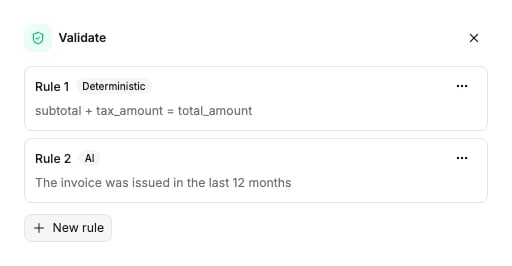
Options
Each rule:
The schema the API accepts is generated from the same source: Validate node schema.
Checks
Every check kind below is deterministic and free. Two are combinators that nest other checks.
Each check resolves to pass, fail, or inconclusive. A check is inconclusive when the field it names is missing, or cannot be read as the expected type. Numbers are read leniently:
"€1.234,56" and "1,234.56" both parse. Dates accept the common written formats.
all_of fails if any child fails, otherwise it is inconclusive if any child is inconclusive, otherwise it passes. any_of passes if any child passes, otherwise it is inconclusive if any child is inconclusive, otherwise it fails. A combinator holds up to 32 checks. Studio nests one level; the API accepts deeper nesting.
A rule’s check cannot contain a
validation check (the outcome of another rule). The API rejects it. To act on a rule’s verdict, route on it with an If/Else node instead.Check payloads
operator defaults to sum; tolerance to 0; case_sensitive to false. Unset bounds are null. threshold is an integer from 0 to 100.
Expressions
An expression check runs a CEL expression over the whole extraction. Use it for a condition the other checks cannot name: a total over a list of line items, a per-row comparison, a conditional.- The expression reads one root variable,
data, which holds the whole extraction. - Fields use their extracted name:
data.ibruto,data.lineas. An expression names no persistent id, so renaming a field in the schema breaks every expression that names it. The rule then reports inconclusive. - The CEL builtins all work:
map,filter,all,exists,size,has,startsWith. - Three helpers come on top of them, because CEL coerces no number and folds no list, and an extracted value is frequently a string such as
"1.234,56":num(v)reads one value as a number, with the same lenient parse the other checks use.sum(list)adds a list, and reads each element the same way. Bare+does not: on two strings it joins them end to end.abs(x).
has(data.x)asks whether the key is there, not whether it holds a value. A field that was extracted as null answerstrue. A rule that means “was extracted” readsdata.x != null.- Every evaluation error resolves to inconclusive: an expression that does not parse, that names a field the extraction does not carry, that divides by zero, or that answers with something other than a boolean. An expression never fails the run.
Connects to
Validate also feeds Knowledge.
What it returns
One verdict per rule per extraction. The run results carry them asextractions[].validations[], on the entry whose fields the rules judged, so in a split workflow each piece carries its own. The key is always present: [] when the workflow has no Validate node.
In the app, the verdicts appear in the Validation tab of the results, next to the extracted data. See Verification and review. A failed rule marks the document; it never stops the run or hides the extraction.
Downstream nodes read the verdicts too. An If/Else node routes on a rule’s outcome with a
validation condition, and a Slack alert prints it with ${validation.<rule_id>.status}.
On the public API the verdicts sit in each
extractions[] entry of GET /v3/runs/{run_id}/. The Python SDK exposes them as result.validations (per partition, result.partitions[i].validations); the TypeScript SDK as extraction.validations on each entry of result.extractions.Billing
An AI rule costs 5 credits, billed once per rule per extraction, not per page. A deterministic rule, including an expression, costs 0 credits. A three-rule Validate with one AI rule costs 5 credits whether the document is 1 page or 100. Full price list: How credits work.Examples
- Invoice processing: the Extract the rules on this page check. Add the
totals-add-upandvendor-legitrules after it. - Bank statement processing: an
expressioncheck that sums the transactions against the closing balance.