

"source": "smart_lookup" or "source": "lookup_if_missing" is resolved by matching the document against a reference file (a CSV) you attach to the Extract node, instead of being read off the page. In the Studio palette it appears as part of Extract, under the Intelligence section; there is no separate chip.
Use it when a value the document carries, a product name, a supplier name, a city, has to become an identifier defined outside the document: a SKU, a supplier code, a location ID. Extraction reads the raw value; the lookup returns the matching row’s value from your file.
Example: an invoice names the product “Blue Widget 500ml”. Your master file maps product names to SKUs. The lookup matches “Blue Widget 500ml” to its row and returns SKU-10234.
To check a value against a fixed list of options, use a select field instead. Smart lookup is for a list that lives in an external file and returns a different value than the one being matched.
The node
An Extract node with one extracted field and one looked-up field, plus the reference file and a hint for the matcher:extraction_schema.fields with the other fields; there is no separate list. The SDKs read each path in lookup_files from disk and send it as lookup_file_uploads. The API call sends the file content inline, base64-encoded. An Extract node with a lookup field but no reference file is rejected when the workflow is saved.
Matching is done by the model. There is no step where you pick the match column and the output column. The matcher works from the field’s name and description, plus the optional lookup_suggestion, so it can join on more than one signal at once, for example name and city when name alone is not unique.
The extracted field and the looked-up field stay separate. A lookup does not rewrite the extraction schema; it marks one field as resolved from the reference file instead of the document, so you can always tell which value came from where.
In Studio
Reference files and matcher settings belong to the Extract node and are shared by every lookup field in it. Whether a given field uses them is set per field.1
Upload the reference file
Open the Extract node’s Config tab and add one or more CSV files under Lookup files. Every lookup field in this node can draw on all of them.
2
Turn Lookup on for a field
Open the field in the node’s Schema tab and switch Lookup on.
3
Pick the lookup mode
Choose Always look up or Only if not extracted. See
source in the options table below.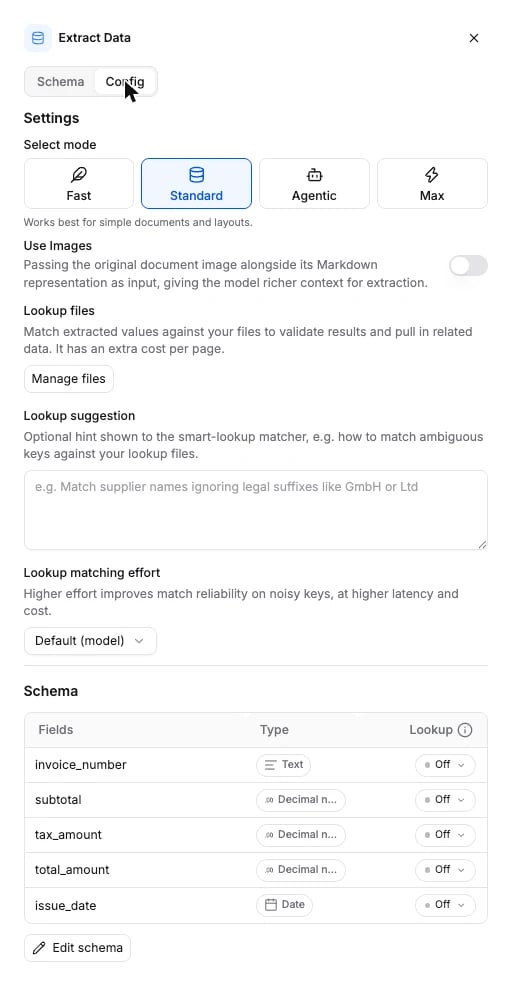
Options
Node-level options sit on the Extract node. The per-field switch is the field’ssource.
source is the per-field switch. Its three values are the three positions of the Lookup control in Studio:
The schema the API accepts is generated from the same source: Extract node schema.
Connects to
Smart lookup runs inside the Extract node, so it has no edges of its own.
What it returns
A lookup field comes back inextractions[].fields like any other field, keyed by its name, with the same value, confidence and evidence shape. There is no separate section for lookups.
vendor_name was read off the page. vendor_id was resolved from the reference file, so its confidence is null and its evidence is empty: the lookup reports no confidence, and there is no page the value was read from. Both sit in the same fields object, keyed by the name you gave each one.
- When a row matches, the field carries the matched row’s value, subject to the lookup mode.
- When no row matches, a
smart_lookupfield returnsnull; there is nothing to fall back on. Alookup_if_missingfield keeps whatever extraction found and isnullonly when extraction found nothing either. The lookup never returns a partial or guessed match.
Billing
75 credits per page of the document, on top of the Extract tier, when the Extract node has at least one lookup field. The number of lookup fields and the number of rows matched do not change the price. Full price list: How credits work.Current scope
Supported today:- CSV reference files, several per Extract node.
- Any number of lookup fields per node, each resolved on its own.
- Matching on more than one field at once when that is what tells rows apart.
- Per-field lookup mode, plus node-level matching effort and an optional hint.
- XLS, XLSX and other binary spreadsheets. Convert them to CSV first.
- Multi-step joins or transformations across more than one reference file.
- Editing a lookup result after a run. If the reference file was wrong or incomplete, replace it and run again.
FAQ
What happens when the extracted value matches nothing in the reference file?
What happens when the extracted value matches nothing in the reference file?
An Always look up field returns
null. An Only if not extracted field keeps its extracted value when it has one; only a field extraction also left blank ends up null. Nothing is guessed or partially filled in.Can I update the reference file after building the workflow?
Can I update the reference file after building the workflow?
Yes. Replace the CSV under the Extract node’s Lookup files, or send a new
lookup_file_uploads on update. Later runs use the new file.Does a lookup change the extraction output?
Does a lookup change the extraction output?
No. The extracted fields are unchanged. The lookup marks one field as resolved from the reference file instead of the document; it does not merge into another field.
Examples
- Invoice processing: the usual Parse to Extract shape, where a vendor lookup slots in.