

mode) sets how much work to spend per page.
The node
string, float, date, enum, object and the rest) are on Field types. How to write a schema that extracts well is on Schemas.
The same node on the agentic tier, with a Smart lookup field that resolves the supplier name against a reference CSV:
lookup_files from disk and send it as lookup_file_uploads. The API call sends the file content inline, base64-encoded.
The Python SDK’s
extract() does not take mode or lookup_reasoning_effort yet. Set them in the API JSON, in Studio, or from the TypeScript SDK.branch argument.
In Studio
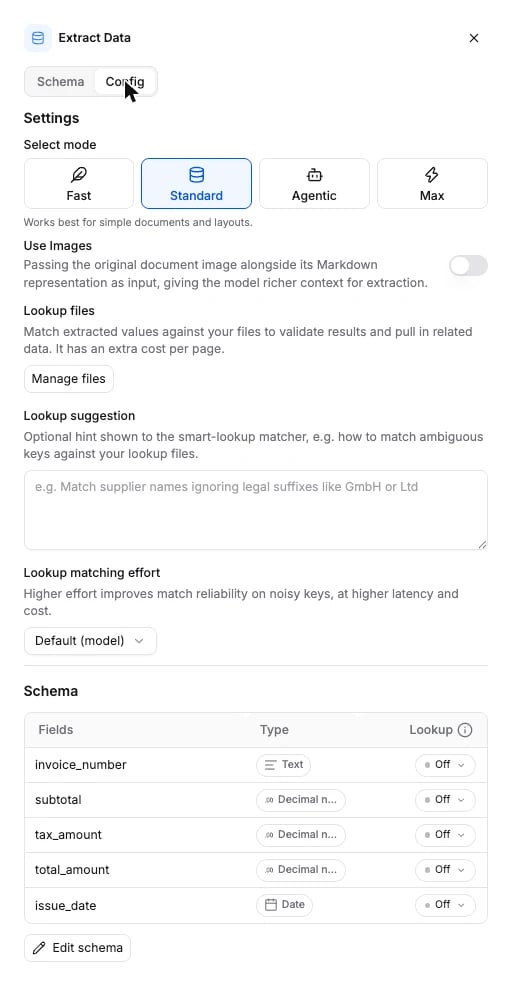
Click the Extract node on the canvas to open its panel. The Schema tab holds the fields. The Config tab holds the tier cards and the Lookup files, Lookup suggestion and Lookup matching effort controls.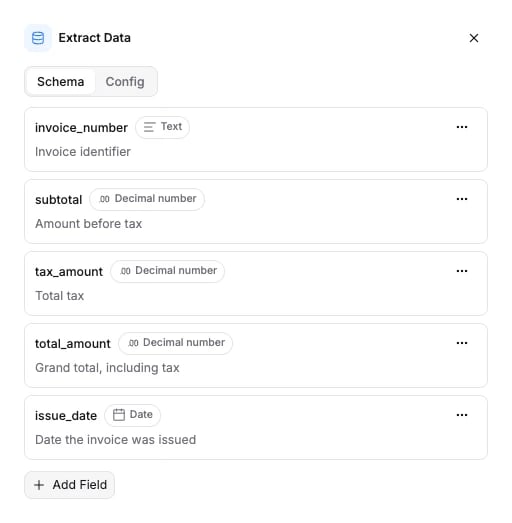
Tiers
Options
extraction_schema is required. Every other field is optional. Omit a field and the default applies.
A field’s
source decides where its value comes from: extraction (the document, the default), smart_lookup (the reference file, always) or lookup_if_missing (the document first, the reference file when extraction left it blank).
The schema the API accepts is generated from the same source: Extract node schema.
Connects to
An Extract node has one outgoing edge at most. Send it to Validate to check the values, If/Else to branch on them, Slack alert to announce them, or Knowledge to index the document.What it returns
Extract fills theextractions section of the run results. A workflow with one Extract and no Split returns one entry, and every field in it carries a value, a confidence and the evidence it came from.
split_name and partition stay null unless a Split node ran. fields is keyed by the field name you gave on the node. value is a string on the wire whatever the field’s data_type, and null when nothing was found. confidence is on a 0 to 100 scale. evidence lists the source snippets and the page each came from.
Every key on a field
Every key on a field
value_override holds a human correction from review, or null. verification_status is the review state of the value, and starts at not_verified. Both come from Verification and review.value is a string or null, so parse it by the field’s data_type on your side:
- A
booleanfield returns the string"True"or"False". - A
multi_selectfield returns one comma-separated string, for example"a, b, c", not a list. - A field the model could not find returns
{ "value": null, "value_override": null, "verification_status": "not_verified", "confidence": null, "evidence": [] }. - An
objectfield returns a list of rows. Each row is a dict from nested field name to the same{ value, value_override, verification_status, confidence, evidence }shape.
extractions holds one entry per split and partition. See Split. The whole run envelope is on Runs & results.
Billing
Billed per page at the tier’s rate (table above). A node with at least one lookup field adds 75 credits per page for Smart Lookup. Schema size and field count do not change the price. Full price list: How credits work.Examples
- Invoice processing: the usual Parse to Extract shape, with line items as an object field.
- Resume parsing: nested fields and multi-select.
- Contract analysis: long documents, dates and enums.
- Bank statement processing: Split, then one Extract per statement.