

The node
instructions and reference_document_ids. Set font and output_mode through the API JSON.
Reference documents
Upload references to the workflow first, then put the returned ids inreference_document_ids:
.csv, .txt, .md, .rst or .pdf. A text file comes back ready at once. A PDF comes back pending while anyformat parses it once, at upload, never on a run. Poll GET /v3/workflows/{workflow_id}/edit-references/ (Python: client.list_edit_references(workflow_id)) until it settles. A run whose Edit node names a reference that is not ready is refused, so the form is never filled from a partial reference. DELETE /v3/workflows/{workflow_id}/edit-references/{document_id}/ removes a reference; remove its id from the node in the same change.
In Studio
Click the Edit node on the canvas to open its panel. The panel has a Fill instructions text box, a font picker, an output mode picker, and a reference files section where you upload and remove reference documents.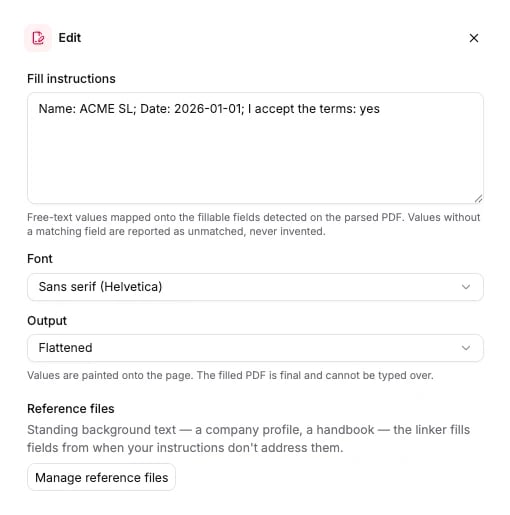
Options
Every field is optional. Omit a field and the default applies.
The schema the API accepts is generated from the same source: Edit node schema.
Connects to
Edit reads geometry straight from the parsed document, so it sits directly after Parse. A Classify or Extract in between adds nothing it can use. The Python builder accepts one Edit node per workflow.What it returns
Edit fills theedits section of the run results: one entry per file, with every form field the node detected, the value written into it, and a link to the filled PDF.
download_url is valid for 15 minutes from the moment the response was built. Re-read the run for a fresh link instead of storing it. A field with state: "prefilled" is never overwritten and keeps value: null. confidence grades how surely an instruction addresses the field, not whether the written value is correct. unmatched_instructions lists the instruction fragments that matched no field.
Every key on a detected field
Every key on a detected field
run.wait().edits holds the same entries.
Billing
35 credits per page of the form the node fills. A PDF reference costs 25 credits per page, once, when you upload it, because that upload is a parse. Runs that use the reference afterwards pay nothing for it. Text references (.csv, .txt, .md, .rst) are free. Full price list: How credits work.
Examples
- Fill a supplier onboarding form from your company profile: upload
company-profile.csvas a reference, buildParse → Editwith its id, run the blank form through the workflow, and downloadedits[0].download_url. - Let a reviewer correct the result: set
output_mode: "editable"so every value stays in a live form field. - Parse-only workflow: the Parse node that Edit reads from.