

The node
type on the wire is splitter. In the API, routing lives on the edges. An edge that leaves a Split node must set branch to a rule id, not its name, and each rule needs its own target node:
branch accepts the rule object or its id string. Once a workflow has a Split node, every extract() call needs a branch.
The same node after a Classify node. Only the documents in one category reach the Split node:
In Studio
Click the Split node on the canvas to open its panel. Add a rule with its Type (the name), Description and optional Partition key. Each rule appears as a port on the node; drag from a port to the Extract node that handles that rule.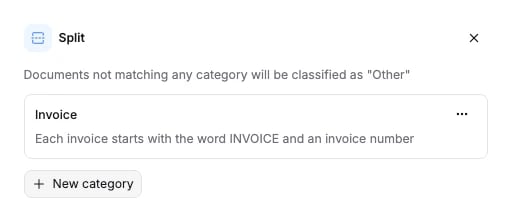
Options
rules is required. partition_key is optional on each rule.
Partition keys. Without one, every page that matches a rule flows on as one document: a batch of ten statements from ten accounts reaches Extract as a single statement. Set
partition_key to the name of the value that tells the documents apart, for example account_number or invoice_number. The model reads that value on each page. Pages that share one value form one split, and each split is extracted on its own. Ten accounts become ten extractions, each with its own partition value in the results. The key is a hint to the model, not a reference to the Extract schema; it does not have to match a field name downstream.
The schema the API accepts is generated from the same source: Splitter node schema.
Connects to
A Classify node can feed Split in place of Parse. Split feeds Extract and nothing else.
What it returns
Split fills thesplits section of the run results, one entry per rule. The entry names the rule and lists the pages that fell under it, and a rule with a partition key adds one partition per distinct value.
name is the rule’s name. Page numbers are 1-indexed. confidence is on a 0 to 100 scale: a partition reports the minimum across its page ranges, and a rule the minimum across its partitions. It is null when no page matched. A rule’s files is the union of its partitions, so the second partition of this rule is elided above.
Both partitions in full
Both partitions in full
extractions[], one entry per split and partition. Join on split_name (the rule name) and partition (the partition value, null when the rule has no partition key):
Billing
Billed at 25 credits per page. Full price list: How credits work.Examples
- Bank statement processing: one file, many statements, a partition key per account.
- Invoice processing: a scanned batch of invoices split by invoice number.