

The node
client.workflow(...).parse().extract(...)) has no slack_alert() verb. Build a WorkflowDefinition from the node classes instead, as above, and pass it to create_workflow. The TypeScript builder has no method either; send the JSON.
channel_id is the Slack channel id (C…), which is stable across renames. Get it from the Studio channel picker, or from Slack: open the channel details, and the id is at the bottom. channel_name is the display name shown in the app and in logs; it is not re-resolved on every send.
In Studio
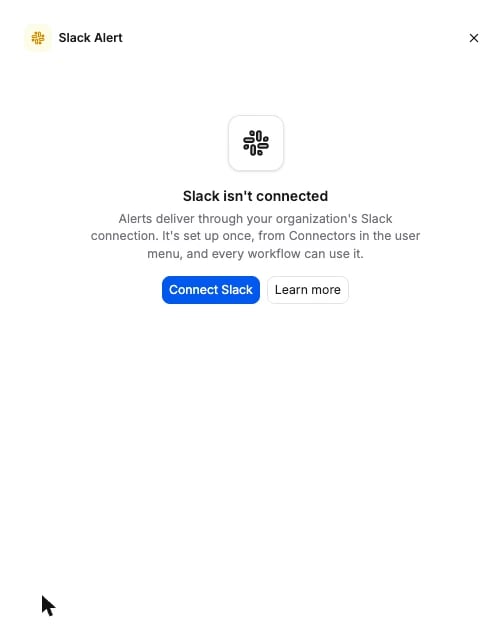
Click the Slack alert node on the canvas to open its panel. It has a Slack Channel picker that lists your public channels, a Message editor where/ or the field picker inserts an extracted field as a chip, a Severity choice (Info, Warning, Critical), and a Preview of the rendered message with a Send test button that posts it to the chosen channel. If nobody has connected Slack for your organization yet, the panel shows a Connect Slack prompt instead. That is what a workspace sees until the connector is set up:
Options
The schema the API accepts is generated from the same source: Slack alert node schema.
Placeholders
A
validation placeholder needs a Validate node upstream that carries the rule. A placeholder that resolves to nothing, because the field was renamed, deleted, or not extracted for this document, or the rule did not run, renders as <missing: …> in the delivered message. Nothing is dropped silently.
Connects to
Parse, Classify, and Split cannot feed it: they carry no extracted fields for the template to fill. The API rejects those edges.
What it returns
A message in the channel, and nothing in the run results. Each message carries:- The rendered template, with the severity colour on the card.
- An Open document button that opens the file in Studio at the workflow version the alert fired against.
Billing
Free. Slack alert runs no model and bills no credits. Test messages from Studio are free too. Full price list: How credits work.Examples
- Invoice processing: post every invoice over 10,000 to
#financewith the If/Else on that page in front of this node. - Contract analysis: alert legal when a contract’s key clause fails an AI validation rule, with
${validation.<rule_id>.detail}in the message.