

The node
client.workflow(...)) has no knowledge() method, so the example builds the graph as a WorkflowDefinition. The API requires an inbound edge into the node, but the edge selects no input: indexing reads every parsed file in the completed run.
Index existing documents
Adding the node does not automatically index documents from runs that finished before the node existed. In the workflow’s Knowledge tab, a member can choose Index existing documents for the first corpus, or Retry indexing after a failed attempt. While the action runs, the tab shows Indexing documents. Once a corpus exists, it never needs a manual update: new or changed documents are re-indexed in the background automatically, and the existing corpus keeps serving Ask and Browse throughout. The action reuses processed documents. It does not re-extract them. It is a maintenance action in the app, not an API or MCP workflow.Ask a question
Once a usable index exists, ask the corpus throughPOST /v3/workflows/{workflow_id}/knowledge/ask:
thread_id that starts with kb- to ask a follow-up in the context of earlier questions in that thread. Omit it and each question stands alone. The full request and response, with the error codes, is on Ask. An AI agent asks the same question through the ask_knowledge tool of the MCP server.
In Studio
Drag Knowledge from the palette and it appears as a band around the whole graph, not as a card, because its scope is the whole workflow. Its panel has nothing to configure; it explains what the node does and points you to the workflow’s Knowledge tab, where you browse the indexed documents and ask questions.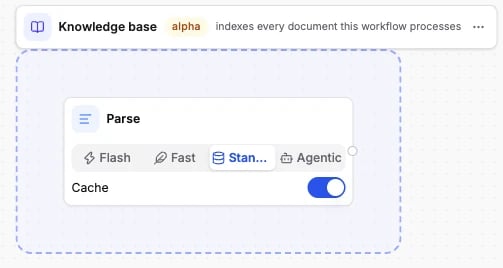
Options
The node has no fields.id and type are all it carries.
The schema the API accepts is generated from the same source: Knowledge node schema.
Connects to
Knowledge accepts one edge from Parse, Classify, Extract or Validate. It is terminal: nothing can follow it. Which accepted node feeds it makes no difference because indexing reads the completed run. A workflow has at most one Knowledge node; the API rejects a second one.What it returns
Nothing in the run results. Knowledge emits nothing downstream and adds no section to the run. It writes to the workflow’s knowledge base instead. Completed runs ingest parsed files while Knowledge is present. The corpus keeps the current parsed content for each live file. The corpus is workflow-scoped, not version-scoped. It can contain parses from older workflow versions, but it is not a version history. You read the corpus in two places:- The Knowledge tab in the app: browse the documents, search them, and ask questions.
POST /v3/workflows/{workflow_id}/knowledge/ask: an answer plus citations, each resolved to afile_id, apageand abboxin the source PDF. Without a Knowledge node the endpoint returns409 KNOWLEDGE_NOT_ENABLED.409 KNOWLEDGE_NOT_READYmeans no usable snapshot is available yet.
Billing
- Indexing: 2 credits per page whose source content is new or changed in a completed run. Re-running unchanged documents costs nothing. Backfill, repair and an unchanged reindex are maintenance and do not spend knowledge-index credits.
- Asking: 8 credits per 10,000 effective input tokens the answering agent reads. A narrow question over a small corpus costs a fraction of a broad sweep over a large one. A question the organization cannot pay for is refused with
402before it runs.
Examples
- Contract analysis: a contract workflow whose documents have lasting value. Add Knowledge and “which suppliers have a 90-day termination clause?” becomes answerable with citations.
- Invoice processing: the usual Parse to Extract shape. Add Knowledge after Extract to keep every invoice searchable.