


How to open Studio
- Create a new workflow: describe what you want to annie on the home screen. She builds the workflow and opens Studio. The conversation continues in the Chat tab.
- On an existing workflow: open the workflow and click the Studio tab.
The canvas and the palette
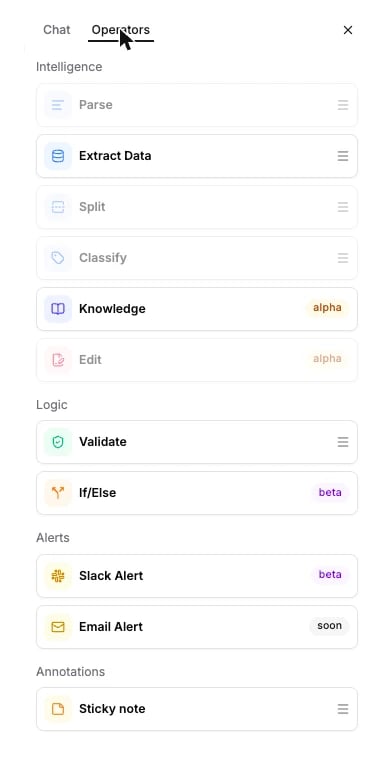
The canvas holds your workflow: the nodes and the connections between them. Click a node to open its configuration panel on the right. The tab on the left labelled Operators is the palette. You drag nodes from it onto the canvas. Its section headers are Intelligence, Logic, Alerts, and Annotations:- Intelligence: Parse, Extract, Split, Classify, and, once enabled for your organization, Knowledge and Edit.
- Logic: Validate and If/Else.
- Alerts: Slack alert and Email alert.
- Annotations: sticky notes. They document the canvas and take no part in the run.
What’s next?
Use Studio
Step-by-step: open Studio, add nodes, connect them, and configure each one
Nodes
What each node does, what it returns, and what it costs