

mode): how much work to spend per page, from reading the PDF’s own text layer to a multi-step pass over dense tables.
The node
In Studio
Click the Parse node on the canvas to open its panel. The four tiers are the cards at the top; the advanced options sit below them.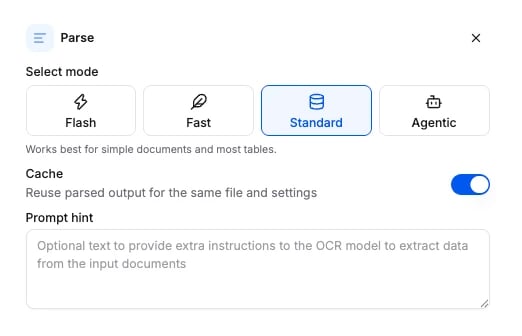
Tiers
Options
Every field is optional. Omit a field and the default applies. Fields that belong to another tier are accepted and ignored.
The schema the API accepts is generated from the same source: Parse node schema.
Connects to
Nothing feeds Parse. It is always the first node. A workflow has exactly one Parse node, and the app and the API both reject a second one.What it returns
Parse fills theparse section of the run results. Two keys carry the document: markdown holds it as one markup string, and blocks holds the same content block by block.
markdown value is elided above, because it is the whole document and runs to thousands of lines. In it, each block opens with an <a id="p<page>_b<n>"> anchor and every table is an HTML <table> element, so the text stays quotable and a citation can point at one block. parse_confidence is on a 0 to 100 scale; layout_confidence is on a 0 to 1 scale. For a table block, parse_confidence is the mean of the confidence of its cells that carry text, so it reads as the expected fraction of those cells read correctly; blank cells do not enter the mean, and it is null when no cell carries text. Each entry in blocks repeats both confidences and adds the block’s id, type, page and content.
The complete parse section
The complete parse section
text is the same document without the anchors or the table markup. bbox is in fractions of the page size.Billing
Billed per page at the tier’s rate (table above). Acache hit costs nothing. Full price list: How credits work.
Examples
- Parse-only workflow: the document as markup, on each tier.
- POST /v3/parse/: one document on the Fast tier in one call, with no workflow to create.
- Agentic parse to markdown: dense tables on the agentic tier.
- Invoice processing: the usual Parse to Extract shape.