

Confidence
What is confidence?
Confidence is how certain anyformat is about an extracted value. anyformat expresses it as a percentage:- High confidence: the model is very sure
- Low confidence: the value may be ambiguous or unclear
- Field
- Document
- Workflow, as an average
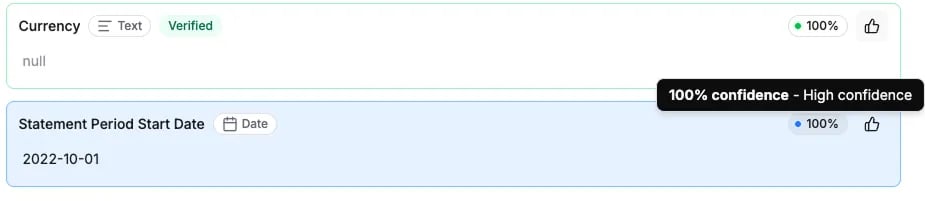
What confidence is (and isn’t)
Confidence IS
- A signal, not a verdict
- A way to prioritize human review
- A guide for where to look first
Confidence is NOT
- A guarantee of correctness
- A replacement for verifying results yourself
- A measure of business accuracy
- High confidence and still be wrong
- Low confidence and still be correct
How to use confidence effectively
Use confidence to:- Focus review on low-confidence fields
- Skip reviewing obviously reliable values
- Reduce overall human effort
Accuracy
What is accuracy?
Accuracy measures how often extracted values are correct, over the documents you verified.Accuracy reflects confirmed correctness, not how sure the model felt.anyformat calculates accuracy from:
- Fields you verified as correct
- Fields you corrected
Accuracy vs confidence
You need both:
- Confidence to guide review
- Accuracy to judge quality
What accuracy tells you
Accuracy helps you answer:- Can I trust this workflow?
- Is it ready to scale?
- Which fields are fragile?
- Ambiguous instructions
- Poor field definitions
- Edge cases in documents
Per field
Both numbers are most useful per field. Sort fields by confidence or accuracy to surface:- Fields that consistently fail
- Fields that no longer need review
- Outliers dragging accuracy down
Improving results
How to improve confidence
To improve confidence:- Make instructions more explicit
- Clarify where information appears
- Reduce ambiguity in field definitions
- Split complex fields into simpler ones
How to improve accuracy
To improve accuracy:- Correct wrong values while verifying
- Review low-confidence fields carefully
- Refine the workflow when patterns appear
- Adjust fields or instructions
Refinement improves future documents, not past ones.
A realistic quality goal
You do not need 100% confidence or 100% accuracy. A good goal is:High accuracy with focused human review on low-confidence cases.That is how anyformat scales without burning time.
What’s next?
Verification & Review
Review and correct results: the loop that builds up accuracy.
Health
Measure quality deliberately with datasets and evaluations.