> ## Documentation Index
> Fetch the complete documentation index at: https://docs.anyformat.ai/llms.txt
> Use this file to discover all available pages before exploring further.
# Split
> Breaks one file that holds several documents into pieces, and extracts each piece on its own.
**Split** takes a file that holds more than one document, a scanned batch of invoices or a bundle of statements, and cuts it into pieces by page. Each piece is a document of one of your **rules**, and each rule is an outgoing branch to its own [Extract](/guides/nodes/extract) node. It lives in the **Intelligence** section of the Studio palette.
A Split node needs at least one rule: an id, a name and a description the model reads. A rule can also carry a **partition key**, the field that separates one document from the next within the same rule.
## The node
```json API theme={null}
{
"id": "split_1",
"type": "splitter",
"rules": [
{ "id": "STATEMENT", "name": "Statement", "description": "A bank account statement.", "partition_key": "account_number" },
{ "id": "CHECK", "name": "Check", "description": "A scanned check." }
]
}
```
```python Python theme={null}
import os
from anyformat.sdk import Client
from anyformat.workflow import Schema, SplitterRule
client = Client(api_key=os.environ["ANYFORMAT_API_KEY"])
statement = SplitterRule(
id="STATEMENT", name="Statement", description="A bank account statement.", partition_key="account_number"
)
check = SplitterRule(id="CHECK", name="Check", description="A scanned check.")
workflow = (
client.workflow("Statement batch")
.parse()
.split(statement, check)
.extract([Schema.float("closing_balance", "Closing balance")], branch=statement)
.extract([Schema.float("amount", "Check amount")], branch=check)
.create()
)
```
```typescript TypeScript theme={null}
import { Anyformat, Schema } from "@anyformat/sdk";
const af = new Anyformat({ apiKey: process.env.ANYFORMAT_API_KEY! });
const statement = { id: "STATEMENT", name: "Statement", description: "A bank account statement.", partition_key: "account_number" };
const check = { id: "CHECK", name: "Check", description: "A scanned check." };
const workflow = await af
.workflow("Statement batch")
.parse()
.split([statement, check])
.extract([Schema.float("closing_balance", "Closing balance")], { branch: statement })
.extract([Schema.float("amount", "Check amount")], { branch: check })
.create();
```
The node's `type` on the wire is `splitter`. In the API, routing lives on the edges. An edge that leaves a Split node must set `branch` to a rule **id**, not its name, and each rule needs its own target node:
```json theme={null}
"edges": [
{ "source": "parse_1", "target": "split_1" },
{ "source": "split_1", "target": "extract_1", "branch": "STATEMENT" },
{ "source": "split_1", "target": "extract_2", "branch": "CHECK" }
]
```
The SDKs write these edges for you. `branch` accepts the rule object or its id string. Once a workflow has a Split node, every `extract()` call needs a `branch`.
The same node after a [Classify](/guides/nodes/classify) node. Only the documents in one category reach the Split node:
```json API theme={null}
"edges": [
{ "source": "parse_1", "target": "classify_1" },
{ "source": "classify_1", "target": "split_1", "branch": "BATCH" },
{ "source": "split_1", "target": "extract_1", "branch": "STATEMENT" }
]
```
```python Python theme={null}
client.workflow("Sorted batches").parse().classify(batch, single).split(statement, route_from=batch)
```
```typescript TypeScript theme={null}
af.workflow("Sorted batches").parse().classify([batch, single]).split([statement], { routeFrom: batch })
```
## In Studio
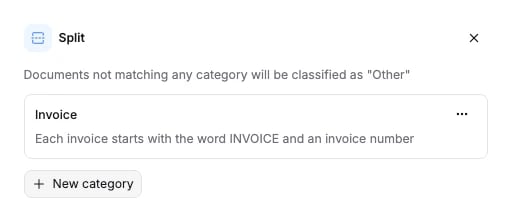
Click the Split node on the canvas to open its panel. Add a rule with its **Type** (the name), **Description** and optional **Partition key**. Each rule appears as a port on the node; drag from a port to the Extract node that handles that rule.
 ## Options
`rules` is required. `partition_key` is optional on each rule.
| Field | Type | Default | What it does |
| ----------------------- | ------------- | -------- | -------------------------------------------------------------------------------------------------------------------------------------------------------------------------------------------------------------------------------- |
| `rules` | array of rule | required | At least one. Each rule has `id`, `name` and `description`, all non-empty strings, and an optional `partition_key`. |
| `rules[].id` | string | required | Stable id. Edges route on it: an outgoing edge's `branch` must equal one rule's `id`. |
| `rules[].name` | string | required | The name shown to the model. It is also the `name` of the split and the `split_name` of its extractions in the results. |
| `rules[].description` | string | required | What pages of this kind look like, written for the model. |
| `rules[].partition_key` | string | `""` | The field that separates one document from the next within this rule. Each distinct value becomes its own split, extracted independently. Empty means the whole rule flows on as one document. At most 255 characters in Studio. |
**Partition keys.** Without one, every page that matches a rule flows on as one document: a batch of ten statements from ten accounts reaches Extract as a single statement. Set `partition_key` to the name of the value that tells the documents apart, for example `account_number` or `invoice_number`. The model reads that value on each page. Pages that share one value form one split, and each split is extracted on its own. Ten accounts become ten extractions, each with its own `partition` value in the results. The key is a hint to the model, not a reference to the Extract schema; it does not have to match a field name downstream.
The schema the API accepts is generated from the same source: [Splitter node schema](/api-reference-v3/node-schemas#splitter).
## What it returns
Split fills the `splits` section of the [run results](/concepts/runs-and-results), one entry per rule, with the pages of each file that fell under it and, when the rule has a partition key, one partition per distinct value:
```json theme={null}
"splits": [
{
"name": "Statement",
"confidence": 91,
"files": [
{ "file_id": "069dcc2c-e14c-7606-8000-2ee4fb17b4e3", "file_name": "batch.pdf", "pages": [1, 2, 3, 4] }
],
"partitions": [
{
"name": "1234-5678",
"confidence": 94,
"files": [{ "file_id": "069dcc2c-e14c-7606-8000-2ee4fb17b4e3", "file_name": "batch.pdf", "pages": [1, 2] }]
},
{
"name": "9876-5432",
"confidence": 91,
"files": [{ "file_id": "069dcc2c-e14c-7606-8000-2ee4fb17b4e3", "file_name": "batch.pdf", "pages": [3, 4] }]
}
]
}
]
```
Page numbers are 1-indexed. `confidence` is on a 0 to 100 scale: a partition reports the minimum across its page ranges, a rule the minimum across its partitions. It is `null` when no page matched. A rule's `files` is the union of its partitions.
The extracted data lives in `extractions[]`, one entry per split and partition. Join on `split_name` (the rule name) and `partition` (the partition value, `null` when the rule has no partition key):
```json theme={null}
"extractions": [
{ "split_name": "Statement", "partition": "1234-5678", "fields": { "closing_balance": { "value": "1520.40", "confidence": 96.0, "evidence": [] } } },
{ "split_name": "Statement", "partition": "9876-5432", "fields": { "closing_balance": { "value": "88.00", "confidence": 93.0, "evidence": [] } } }
]
```
Each field has the shape described on [Extract](/guides/nodes/extract#what-it-returns).
## Connects to
| Direction | Nodes |
| --------- | ---------------------------------------------------------------- |
| Fed by | [Parse](/guides/nodes/parse), [Classify](/guides/nodes/classify) |
| Feeds | [Extract](/guides/nodes/extract) |
Each outgoing edge carries one rule id, and each rule routes to its own Extract node. Two rules cannot share a target. A workflow has one Split node at most in the SDK builders.
## Billing
Billed at 25 credits per page. Full price list: [How credits work](/concepts/how-credits-work).
## Examples
* [Bank statement processing](/examples/bank-statement-processing): one file, many statements, a partition key per account.
* [Invoice processing](/examples/invoice-processing): a scanned batch of invoices split by invoice number.
## Options
`rules` is required. `partition_key` is optional on each rule.
| Field | Type | Default | What it does |
| ----------------------- | ------------- | -------- | -------------------------------------------------------------------------------------------------------------------------------------------------------------------------------------------------------------------------------- |
| `rules` | array of rule | required | At least one. Each rule has `id`, `name` and `description`, all non-empty strings, and an optional `partition_key`. |
| `rules[].id` | string | required | Stable id. Edges route on it: an outgoing edge's `branch` must equal one rule's `id`. |
| `rules[].name` | string | required | The name shown to the model. It is also the `name` of the split and the `split_name` of its extractions in the results. |
| `rules[].description` | string | required | What pages of this kind look like, written for the model. |
| `rules[].partition_key` | string | `""` | The field that separates one document from the next within this rule. Each distinct value becomes its own split, extracted independently. Empty means the whole rule flows on as one document. At most 255 characters in Studio. |
**Partition keys.** Without one, every page that matches a rule flows on as one document: a batch of ten statements from ten accounts reaches Extract as a single statement. Set `partition_key` to the name of the value that tells the documents apart, for example `account_number` or `invoice_number`. The model reads that value on each page. Pages that share one value form one split, and each split is extracted on its own. Ten accounts become ten extractions, each with its own `partition` value in the results. The key is a hint to the model, not a reference to the Extract schema; it does not have to match a field name downstream.
The schema the API accepts is generated from the same source: [Splitter node schema](/api-reference-v3/node-schemas#splitter).
## What it returns
Split fills the `splits` section of the [run results](/concepts/runs-and-results), one entry per rule, with the pages of each file that fell under it and, when the rule has a partition key, one partition per distinct value:
```json theme={null}
"splits": [
{
"name": "Statement",
"confidence": 91,
"files": [
{ "file_id": "069dcc2c-e14c-7606-8000-2ee4fb17b4e3", "file_name": "batch.pdf", "pages": [1, 2, 3, 4] }
],
"partitions": [
{
"name": "1234-5678",
"confidence": 94,
"files": [{ "file_id": "069dcc2c-e14c-7606-8000-2ee4fb17b4e3", "file_name": "batch.pdf", "pages": [1, 2] }]
},
{
"name": "9876-5432",
"confidence": 91,
"files": [{ "file_id": "069dcc2c-e14c-7606-8000-2ee4fb17b4e3", "file_name": "batch.pdf", "pages": [3, 4] }]
}
]
}
]
```
Page numbers are 1-indexed. `confidence` is on a 0 to 100 scale: a partition reports the minimum across its page ranges, a rule the minimum across its partitions. It is `null` when no page matched. A rule's `files` is the union of its partitions.
The extracted data lives in `extractions[]`, one entry per split and partition. Join on `split_name` (the rule name) and `partition` (the partition value, `null` when the rule has no partition key):
```json theme={null}
"extractions": [
{ "split_name": "Statement", "partition": "1234-5678", "fields": { "closing_balance": { "value": "1520.40", "confidence": 96.0, "evidence": [] } } },
{ "split_name": "Statement", "partition": "9876-5432", "fields": { "closing_balance": { "value": "88.00", "confidence": 93.0, "evidence": [] } } }
]
```
Each field has the shape described on [Extract](/guides/nodes/extract#what-it-returns).
## Connects to
| Direction | Nodes |
| --------- | ---------------------------------------------------------------- |
| Fed by | [Parse](/guides/nodes/parse), [Classify](/guides/nodes/classify) |
| Feeds | [Extract](/guides/nodes/extract) |
Each outgoing edge carries one rule id, and each rule routes to its own Extract node. Two rules cannot share a target. A workflow has one Split node at most in the SDK builders.
## Billing
Billed at 25 credits per page. Full price list: [How credits work](/concepts/how-credits-work).
## Examples
* [Bank statement processing](/examples/bank-statement-processing): one file, many statements, a partition key per account.
* [Invoice processing](/examples/invoice-processing): a scanned batch of invoices split by invoice number.