> ## Documentation Index
> Fetch the complete documentation index at: https://docs.anyformat.ai/llms.txt
> Use this file to discover all available pages before exploring further.
# Smart lookup
> Resolves a field against a reference file you upload instead of reading it off the page, so a name on the document becomes the code your systems use.
**Smart lookup** is a capability of the [Extract](/guides/nodes/extract) node, not a node of its own. A field with `"source": "smart_lookup"` or `"source": "lookup_if_missing"` is resolved by matching the document against a reference file (a CSV) you attach to the Extract node, instead of being read off the page. In the Studio palette it appears as part of Extract, under the **Intelligence** section; there is no separate chip.
Use it when a value the document carries, a product name, a supplier name, a city, has to become an identifier defined outside the document: a SKU, a supplier code, a location ID. Extraction reads the raw value; the lookup returns the matching row's value from your file.
**Example:** an invoice names the product "Blue Widget 500ml". Your master file maps product names to SKUs. The lookup matches "Blue Widget 500ml" to its row and returns `SKU-10234`.
To check a value against a fixed list of options, use a [select field](/concepts/field-types) instead. Smart lookup is for a list that lives in an external file and returns a different value than the one being matched.
## The node
An Extract node with one extracted field and one looked-up field, plus the reference file and a hint for the matcher:
```json API theme={null}
{
"id": "extract_1",
"type": "extract",
"extraction_schema": {
"fields": [
{ "name": "vendor_name", "description": "Vendor as printed on the document", "data_type": "string" },
{ "name": "vendor_id", "description": "Canonical vendor code from the catalog, joined on vendor_name", "data_type": "string", "source": "smart_lookup" }
]
},
"lookup_file_uploads": [
{ "filename": "vendors.csv", "content": "" }
],
"lookup_suggestion": "Match vendor_name against the vendor_name column ignoring legal suffixes like GmbH or Ltd; return vendor_id."
}
```
```python Python theme={null}
import os
from anyformat.sdk import Client
from anyformat.workflow import Schema
client = Client(api_key=os.environ["ANYFORMAT_API_KEY"])
workflow = (
client.workflow("Invoices with vendor codes")
.parse()
.extract(
[
Schema.string("vendor_name", "Vendor as printed on the document"),
Schema.string("vendor_id", "Canonical vendor code from the catalog, joined on vendor_name", source="smart_lookup"),
],
lookup_files=["vendors.csv"],
lookup_suggestion="Match vendor_name against the vendor_name column ignoring legal suffixes like GmbH or Ltd; return vendor_id.",
)
.create()
)
```
```typescript TypeScript theme={null}
import { Anyformat, Schema } from "@anyformat/sdk";
const af = new Anyformat({ apiKey: process.env.ANYFORMAT_API_KEY! });
const workflow = await af
.workflow("Invoices with vendor codes")
.parse()
.extract(
[
Schema.string("vendor_name", "Vendor as printed on the document"),
Schema.string("vendor_id", "Canonical vendor code from the catalog, joined on vendor_name", { source: "smart_lookup" }),
],
{
lookupFiles: ["vendors.csv"],
lookupSuggestion: "Match vendor_name against the vendor_name column ignoring legal suffixes like GmbH or Ltd; return vendor_id.",
},
)
.create();
```
The looked-up field lives in `extraction_schema.fields` with the other fields; there is no separate list. The SDKs read each path in `lookup_files` from disk and send it as `lookup_file_uploads`. The API call sends the file content inline, base64-encoded. An Extract node with a lookup field but no reference file is rejected when the workflow is saved.
Matching is done by the model. There is no step where you pick the match column and the output column. The matcher works from the field's name and description, plus the optional `lookup_suggestion`, so it can join on more than one signal at once, for example name **and** city when name alone is not unique.
The extracted field and the looked-up field stay separate. A lookup does not rewrite the extraction schema; it marks one field as resolved from the reference file instead of the document, so you can always tell which value came from where.
## In Studio
Reference files and matcher settings belong to the Extract node and are shared by every lookup field in it. Whether a given field uses them is set per field.
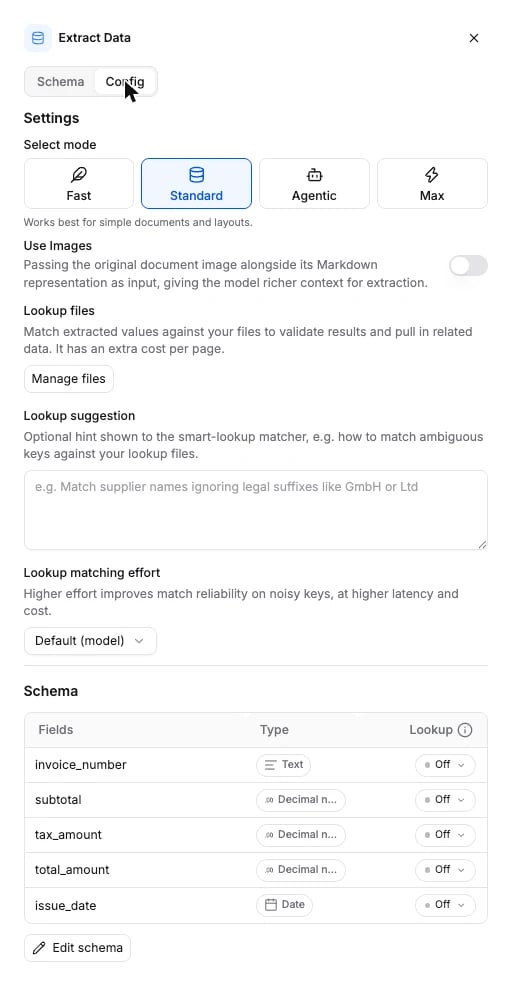
Open the Extract node's **Config** tab and add one or more CSV files under **Lookup files**. Every lookup field in this node can draw on all of them.
Open the field in the node's **Schema** tab and switch **Lookup** on.
Choose **Always look up** or **Only if not extracted**. See `source` in the options table below.
The **Lookup suggestion** box and the **Lookup matching effort** selector sit under the lookup files on the **Config** tab.
 ## Options
Node-level options sit on the Extract node. The per-field switch is the field's `source`.
| Field | Type | Default | What it does |
| ------------------------- | ----------------------------------------------------- | ------------ | --------------------------------------------------------------------------------------------------------------------------------------------------------------------------------------------------------------------------------------------------- |
| `lookup_file_uploads` | array of `{ filename, content }` | `[]` | Reference CSV files sent inline, `content` base64-encoded. Each one is uploaded and its URI is appended to `lookup_files`. Create-input only: it is not stored on the node. |
| `lookup_files` | array of string | `[]` | URIs of the reference files already stored on the node. Read it back from `GET`; write `lookup_file_uploads` to add files. |
| `lookup_suggestion` | string | `null` | Free-form hint shown to the matcher, for matching rules the data alone does not show: "Match supplier names ignoring legal suffixes like GmbH or Ltd". Applies to every lookup field in the node. |
| `lookup_reasoning_effort` | `minimal` \| `low` \| `medium` \| `high` | `null` | How hard the matcher works on noisy or inexact keys: typos, formatting differences, partial names. `null` is the model default. Higher effort improves match reliability at higher latency and cost. Shown as **Lookup matching effort** in Studio. |
| `fields[].source` | `extraction` \| `smart_lookup` \| `lookup_if_missing` | `extraction` | Where the field's value comes from. See below. |
`source` is the per-field switch. Its three values are the three positions of the **Lookup** control in Studio:
| `source` | In Studio | What happens |
| ------------------- | ------------------------- | ------------------------------------------------------------------------------------------------------------------------------------------------------------ |
| `extraction` | Lookup off | The field returns only what extraction finds in the document. The default. |
| `smart_lookup` | **Always look up** | The field is resolved entirely from the reference file. Extraction never reads it from the document. |
| `lookup_if_missing` | **Only if not extracted** | Extraction runs first. The lookup fills the field only where extraction left it blank. A value extraction found is kept even when the lookup finds no match. |
Start with the default matching effort. Raise it only when you see missed matches on messy source data.
The schema the API accepts is generated from the same source: [Extract node schema](/api-reference-v3/node-schemas#extract).
## What it returns
A lookup field comes back in `extractions[].fields` like any other field, keyed by its name, with the same `value`, `confidence` and `evidence` shape. There is no separate section for lookups. See [Extract](/guides/nodes/extract#what-it-returns).
```json theme={null}
"fields": {
"vendor_name": { "value": "ACME Widgets GmbH", "confidence": 97.0, "evidence": [{ "text": "ACME Widgets GmbH", "page_number": 1 }] },
"vendor_id": { "value": "V-10234", "confidence": 95.0, "evidence": [] }
}
```
* When a row matches, the field carries the matched row's value, subject to the lookup mode.
* When no row matches, a `smart_lookup` field returns `null`; there is nothing to fall back on. A `lookup_if_missing` field keeps whatever extraction found and is `null` only when extraction found nothing either. The lookup never returns a partial or guessed match.
In the app, lookup fields are marked apart from extraction fields so you can tell which values came from the document and which from your reference file.
## Connects to
Smart lookup lives inside the Extract node, so it has no edges of its own. See [Extract](/guides/nodes/extract#connects-to) for what feeds the node and what it feeds.
## Billing
75 credits per page of the document, on top of the Extract tier, when the Extract node has at least one lookup field. The number of lookup fields and the number of rows matched do not change the price. Full price list: [How credits work](/concepts/how-credits-work).
## Current scope
Supported today:
* CSV reference files, several per Extract node.
* Any number of lookup fields per node, each resolved on its own.
* Matching on more than one field at once when that is what tells rows apart.
* Per-field lookup mode, plus node-level matching effort and an optional hint.
Not supported today:
* XLS, XLSX and other binary spreadsheets. Convert them to CSV first.
* Multi-step joins or transformations across more than one reference file.
* Editing a lookup result after a run. If the reference file was wrong or incomplete, replace it and run again.
## FAQ
An **Always look up** field returns `null`. An **Only if not extracted** field keeps its extracted value when it has one; only a field extraction also left blank ends up `null`. Nothing is guessed or partially filled in.
Yes. Replace the CSV under the Extract node's **Lookup files**, or send a new `lookup_file_uploads` on update. Later runs use the new file.
Yes. Files are uploaded once per Extract node, and every lookup field in that node can draw on all of them.
No. The extracted fields are unchanged. The lookup marks one field as resolved from the reference file instead of the document; it does not merge into another field.
## Examples
* [Invoice processing](/examples/invoice-processing): the usual Parse to Extract shape, where a vendor lookup slots in.
## Options
Node-level options sit on the Extract node. The per-field switch is the field's `source`.
| Field | Type | Default | What it does |
| ------------------------- | ----------------------------------------------------- | ------------ | --------------------------------------------------------------------------------------------------------------------------------------------------------------------------------------------------------------------------------------------------- |
| `lookup_file_uploads` | array of `{ filename, content }` | `[]` | Reference CSV files sent inline, `content` base64-encoded. Each one is uploaded and its URI is appended to `lookup_files`. Create-input only: it is not stored on the node. |
| `lookup_files` | array of string | `[]` | URIs of the reference files already stored on the node. Read it back from `GET`; write `lookup_file_uploads` to add files. |
| `lookup_suggestion` | string | `null` | Free-form hint shown to the matcher, for matching rules the data alone does not show: "Match supplier names ignoring legal suffixes like GmbH or Ltd". Applies to every lookup field in the node. |
| `lookup_reasoning_effort` | `minimal` \| `low` \| `medium` \| `high` | `null` | How hard the matcher works on noisy or inexact keys: typos, formatting differences, partial names. `null` is the model default. Higher effort improves match reliability at higher latency and cost. Shown as **Lookup matching effort** in Studio. |
| `fields[].source` | `extraction` \| `smart_lookup` \| `lookup_if_missing` | `extraction` | Where the field's value comes from. See below. |
`source` is the per-field switch. Its three values are the three positions of the **Lookup** control in Studio:
| `source` | In Studio | What happens |
| ------------------- | ------------------------- | ------------------------------------------------------------------------------------------------------------------------------------------------------------ |
| `extraction` | Lookup off | The field returns only what extraction finds in the document. The default. |
| `smart_lookup` | **Always look up** | The field is resolved entirely from the reference file. Extraction never reads it from the document. |
| `lookup_if_missing` | **Only if not extracted** | Extraction runs first. The lookup fills the field only where extraction left it blank. A value extraction found is kept even when the lookup finds no match. |
Start with the default matching effort. Raise it only when you see missed matches on messy source data.
The schema the API accepts is generated from the same source: [Extract node schema](/api-reference-v3/node-schemas#extract).
## What it returns
A lookup field comes back in `extractions[].fields` like any other field, keyed by its name, with the same `value`, `confidence` and `evidence` shape. There is no separate section for lookups. See [Extract](/guides/nodes/extract#what-it-returns).
```json theme={null}
"fields": {
"vendor_name": { "value": "ACME Widgets GmbH", "confidence": 97.0, "evidence": [{ "text": "ACME Widgets GmbH", "page_number": 1 }] },
"vendor_id": { "value": "V-10234", "confidence": 95.0, "evidence": [] }
}
```
* When a row matches, the field carries the matched row's value, subject to the lookup mode.
* When no row matches, a `smart_lookup` field returns `null`; there is nothing to fall back on. A `lookup_if_missing` field keeps whatever extraction found and is `null` only when extraction found nothing either. The lookup never returns a partial or guessed match.
In the app, lookup fields are marked apart from extraction fields so you can tell which values came from the document and which from your reference file.
## Connects to
Smart lookup lives inside the Extract node, so it has no edges of its own. See [Extract](/guides/nodes/extract#connects-to) for what feeds the node and what it feeds.
## Billing
75 credits per page of the document, on top of the Extract tier, when the Extract node has at least one lookup field. The number of lookup fields and the number of rows matched do not change the price. Full price list: [How credits work](/concepts/how-credits-work).
## Current scope
Supported today:
* CSV reference files, several per Extract node.
* Any number of lookup fields per node, each resolved on its own.
* Matching on more than one field at once when that is what tells rows apart.
* Per-field lookup mode, plus node-level matching effort and an optional hint.
Not supported today:
* XLS, XLSX and other binary spreadsheets. Convert them to CSV first.
* Multi-step joins or transformations across more than one reference file.
* Editing a lookup result after a run. If the reference file was wrong or incomplete, replace it and run again.
## FAQ
An **Always look up** field returns `null`. An **Only if not extracted** field keeps its extracted value when it has one; only a field extraction also left blank ends up `null`. Nothing is guessed or partially filled in.
Yes. Replace the CSV under the Extract node's **Lookup files**, or send a new `lookup_file_uploads` on update. Later runs use the new file.
Yes. Files are uploaded once per Extract node, and every lookup field in that node can draw on all of them.
No. The extracted fields are unchanged. The lookup marks one field as resolved from the reference file instead of the document; it does not merge into another field.
## Examples
* [Invoice processing](/examples/invoice-processing): the usual Parse to Extract shape, where a vendor lookup slots in.