> ## Documentation Index
> Fetch the complete documentation index at: https://docs.anyformat.ai/llms.txt
> Use this file to discover all available pages before exploring further.
# Slack alert
> Posts a message to a Slack channel when a document reaches it, with extracted values and rule verdicts filled in. Free.
**Slack alert** posts a message to a Slack channel for every document that reaches it. The message is a template: you write the text once, and placeholders fill in with the document's extracted values and its [Validate](/guides/nodes/validate) verdicts. It lives in the **Alerts** section of the Studio palette and is in **Beta**.
It is a terminal node. Put it at the end of a branch, usually the **true** branch of an [If/Else](/guides/nodes/if-else), so it fires only on the documents you want to hear about.
It needs the Slack connector. Connect your workspace once per organization: [Slack integration](/integrations/slack).
## The node
```json API theme={null}
{
"id": "slack_1",
"type": "slack_alert",
"channel_id": "C0123ABC",
"channel_name": "#finance",
"message_template": "Invoice from ${field.vendor_name}: ${field.total} ${field.currency}. Totals check: ${validation.totals-add-up.status}",
"severity": "warning"
}
```
```python Python theme={null}
import os
from anyformat.sdk import Client
from anyformat.workflow import (
WorkflowDefinition, Edge,
ParseNode, ExtractNode, ExtractionSchema, Schema,
ValidateNode, ValidationRule, ArithmeticCheck,
)
from anyformat.workflow.nodes import SlackAlertNode
client = Client(api_key=os.environ["ANYFORMAT_API_KEY"])
workflow = client.create_workflow(WorkflowDefinition(
name="Invoices to Slack",
nodes=[
ParseNode(id="parse_1", type="parse"),
ExtractNode(id="extract_1", type="extract", extraction_schema=ExtractionSchema(fields=[
Schema.string("vendor_name", "Vendor name."),
Schema.float("subtotal", "Subtotal before tax."),
Schema.float("tax", "Tax amount."),
Schema.float("total", "Grand total."),
Schema.string("currency", "ISO currency code."),
])),
ValidateNode(id="validate_1", type="validate", rules=[
ValidationRule(id="totals-add-up", kind="deterministic",
check=ArithmeticCheck(type="arithmetic", operands=["subtotal", "tax"], equals="total", tolerance=0.01)),
]),
SlackAlertNode(id="slack_1", type="slack_alert", channel_id="C0123ABC", channel_name="#finance",
message_template="Invoice from ${field.vendor_name}: ${field.total} ${field.currency}. "
"Totals check: ${validation.totals-add-up.status}",
severity="warning"),
],
edges=[
Edge(source="parse_1", target="extract_1"),
Edge(source="extract_1", target="validate_1"),
Edge(source="validate_1", target="slack_1"),
],
))
```
```typescript TypeScript theme={null}
// The TypeScript builder has no slackAlert() method yet.
// Send the API JSON on this page to POST /v3/workflows/, or pass the same
// graph to af.updateWorkflow(workflowId, definition) on an existing workflow.
```
The Python builder (`client.workflow(...).parse().extract(...)`) has no `slack_alert()` verb. Build a `WorkflowDefinition` from the node classes instead, as above, and pass it to `create_workflow`. The TypeScript builder has no method either; send the JSON.
`channel_id` is the Slack channel id (`C…`), which is stable across renames. Get it from the Studio channel picker, or from Slack: open the channel details, and the id is at the bottom. `channel_name` is the display name shown in the app and in logs; it is not re-resolved on every send.
## In Studio
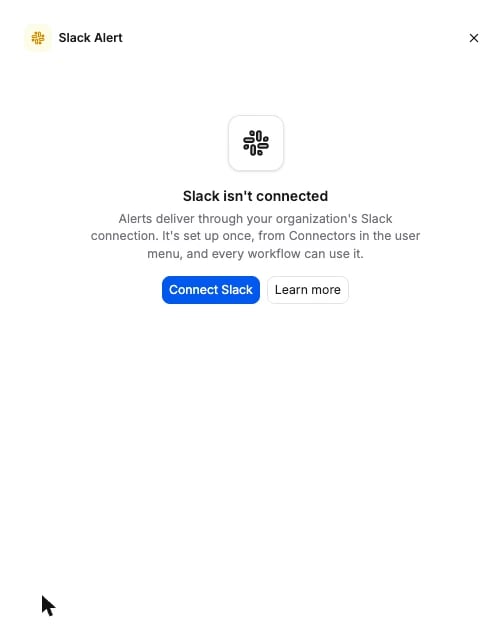
Click the Slack alert node on the canvas to open its panel. It has a **Slack Channel** picker that lists your public channels, a **Message** editor where `/` or the field picker inserts an extracted field as a chip, a **Severity** choice (Info, Warning, Critical), and a **Preview** of the rendered message with a **Send test** button that posts it to the chosen channel. If nobody has connected Slack for your organization yet, the panel shows a **Connect Slack** prompt instead. That is what a workspace sees until the [connector](/integrations/slack) is set up:
 ## Options
| Field | Type | Default | What it does |
| ------------------ | --------------------------------- | -------- | ------------------------------------------------------------------------------------------------------------------------------------------------------------------------------------- |
| `channel_id` | string | required | Slack channel id, for example `C0123ABC`. anyformat joins the channel the first time it posts there. Public channels only. |
| `channel_name` | string | required | Display name of the channel at save time, for example `#finance`. Shown in the app; never used to route. |
| `message_template` | string | required | The message body. Plain text with the placeholders below. |
| `severity` | `info` \| `warning` \| `critical` | `info` | Colour of the bar on the Slack card: blue, amber, red. Presentation only. It changes neither routing nor whether the alert fires; gate that with an [If/Else](/guides/nodes/if-else). |
The schema the API accepts is generated from the same source: [Slack alert node schema](/api-reference-v3/node-schemas#slack_alert).
### Placeholders
| Placeholder | Renders as |
| ---------------------------------- | ---------------------------------------------------------------------------------------------------------------------------------------------------- |
| `${field.}` | The extracted value of that field. Name the field as you did on the Extract node; Studio writes the field's persistent id instead, and both resolve. |
| `${validation..status}` | The verdict of the upstream Validate rule: `pass`, `fail`, or `inconclusive`. |
| `${validation..detail}` | The rule's one-line explanation. |
| `${validation..severity}` | The rule's severity: `error` or `warning`. |
A `validation` placeholder needs a [Validate](/guides/nodes/validate) node upstream that carries the rule. A placeholder that resolves to nothing, because the field was renamed, deleted, or not extracted for this document, or the rule did not run, renders as `` in the delivered message. Nothing is dropped silently.
## What it returns
A message in the channel, and nothing in the run results. Each message carries:
* The rendered template, with the severity colour on the card.
* An **Open document** button that opens the file in Studio at the workflow version the alert fired against.
The alert fires after the node before it finishes for the document. Behind an If/Else, it fires only when the document took that branch. Deliveries are capped per organization at **60 per minute** and **500 per hour**; alerts over the cap are dropped for that window, not queued. Details and troubleshooting: [Slack integration](/integrations/slack#how-alerts-are-delivered).
## Connects to
| Direction | Nodes |
| --------- | ---------------------------------------------------------------------------------------------------------------------- |
| Fed by | [Extract](/guides/nodes/extract), [Validate](/guides/nodes/validate), [If/Else](/guides/nodes/if-else) (either branch) |
| Feeds | nothing. Slack alert is a terminal node. |
Parse, Classify, and Split cannot feed it: they carry no extracted fields for the template to fill. The API rejects those edges.
## Billing
Free. Slack alert runs no model and bills no credits. Test messages from Studio are free too. Full price list: [How credits work](/concepts/how-credits-work).
## Examples
* [Invoice processing](/examples/invoice-processing): post every invoice over 10,000 to `#finance` with the [If/Else](/guides/nodes/if-else) on that page in front of this node.
* [Contract analysis](/examples/contract-analysis): alert legal when a contract's key clause fails an AI validation rule, with `${validation..detail}` in the message.
## Options
| Field | Type | Default | What it does |
| ------------------ | --------------------------------- | -------- | ------------------------------------------------------------------------------------------------------------------------------------------------------------------------------------- |
| `channel_id` | string | required | Slack channel id, for example `C0123ABC`. anyformat joins the channel the first time it posts there. Public channels only. |
| `channel_name` | string | required | Display name of the channel at save time, for example `#finance`. Shown in the app; never used to route. |
| `message_template` | string | required | The message body. Plain text with the placeholders below. |
| `severity` | `info` \| `warning` \| `critical` | `info` | Colour of the bar on the Slack card: blue, amber, red. Presentation only. It changes neither routing nor whether the alert fires; gate that with an [If/Else](/guides/nodes/if-else). |
The schema the API accepts is generated from the same source: [Slack alert node schema](/api-reference-v3/node-schemas#slack_alert).
### Placeholders
| Placeholder | Renders as |
| ---------------------------------- | ---------------------------------------------------------------------------------------------------------------------------------------------------- |
| `${field.}` | The extracted value of that field. Name the field as you did on the Extract node; Studio writes the field's persistent id instead, and both resolve. |
| `${validation..status}` | The verdict of the upstream Validate rule: `pass`, `fail`, or `inconclusive`. |
| `${validation..detail}` | The rule's one-line explanation. |
| `${validation..severity}` | The rule's severity: `error` or `warning`. |
A `validation` placeholder needs a [Validate](/guides/nodes/validate) node upstream that carries the rule. A placeholder that resolves to nothing, because the field was renamed, deleted, or not extracted for this document, or the rule did not run, renders as `` in the delivered message. Nothing is dropped silently.
## What it returns
A message in the channel, and nothing in the run results. Each message carries:
* The rendered template, with the severity colour on the card.
* An **Open document** button that opens the file in Studio at the workflow version the alert fired against.
The alert fires after the node before it finishes for the document. Behind an If/Else, it fires only when the document took that branch. Deliveries are capped per organization at **60 per minute** and **500 per hour**; alerts over the cap are dropped for that window, not queued. Details and troubleshooting: [Slack integration](/integrations/slack#how-alerts-are-delivered).
## Connects to
| Direction | Nodes |
| --------- | ---------------------------------------------------------------------------------------------------------------------- |
| Fed by | [Extract](/guides/nodes/extract), [Validate](/guides/nodes/validate), [If/Else](/guides/nodes/if-else) (either branch) |
| Feeds | nothing. Slack alert is a terminal node. |
Parse, Classify, and Split cannot feed it: they carry no extracted fields for the template to fill. The API rejects those edges.
## Billing
Free. Slack alert runs no model and bills no credits. Test messages from Studio are free too. Full price list: [How credits work](/concepts/how-credits-work).
## Examples
* [Invoice processing](/examples/invoice-processing): post every invoice over 10,000 to `#finance` with the [If/Else](/guides/nodes/if-else) on that page in front of this node.
* [Contract analysis](/examples/contract-analysis): alert legal when a contract's key clause fails an AI validation rule, with `${validation..detail}` in the message.