> ## Documentation Index
> Fetch the complete documentation index at: https://docs.anyformat.ai/llms.txt
> Use this file to discover all available pages before exploring further.
# Parse
> Reads the document and turns it into text, tables and layout that every other node works from. Every workflow starts with one.
**Parse** reads a file (PDF, image, DOCX, XLSX, CSV and more) and turns it into structured text with layout: pages, blocks, tables, reading order, and a confidence per block. Every workflow starts with exactly one Parse node, and every other node reads what Parse produced. It lives in the **Intelligence** section of the Studio palette.
Most workflows never configure it. The one choice that matters is the **tier** (`mode`): how much work to spend per page, from reading the PDF's own text layer to a multi-step pass over dense tables.
## The node
```json API theme={null}
{ "id": "parse_1", "type": "parse" }
```
```python Python theme={null}
import os
from anyformat.sdk import Client
client = Client(api_key=os.environ["ANYFORMAT_API_KEY"])
workflow = (
client.workflow("Read only")
.parse() # mode="standard" by default
.create()
)
```
```typescript TypeScript theme={null}
import { Anyformat } from "@anyformat/sdk";
const af = new Anyformat({ apiKey: process.env.ANYFORMAT_API_KEY! });
const workflow = await af
.workflow("Read only")
.parse() // mode: "standard" by default
.create();
```
A Parse node alone is a complete workflow: it returns the document as markdown and nothing else. See [Parse-only workflow](/examples/parse-only-workflow).
The same node, on the agentic tier with the highest effort:
```json API theme={null}
{ "id": "parse_1", "type": "parse", "mode": "agentic", "effort": "accurate" }
```
```python Python theme={null}
client.workflow("Dense tables").parse(mode="agentic", effort="accurate")
```
```typescript TypeScript theme={null}
af.workflow("Dense tables").parse({ mode: "agentic", effort: "accurate" })
```
## In Studio
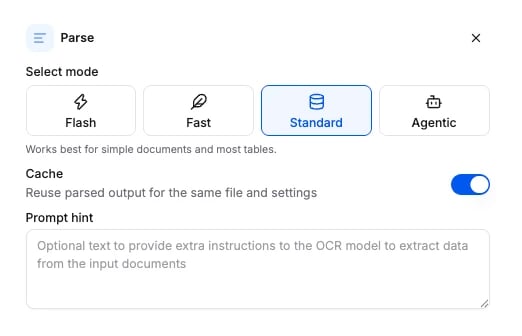
Click the Parse node on the canvas to open its panel. The four tiers are the cards at the top; the advanced options sit below them.
 ## Tiers
| Tier | `mode` | What it does | When to use it | Credits / page |
| ------------------ | ---------- | -------------------------------------------------------------------------------------------------------------------------------- | --------------------------------------------------------- | -------------- |
| **Flash** | `flash` | Reads the PDF's own text layer plus layout grounding. No model call. A page without a text layer is OCR'd (see `scanned_pages`). | Born-digital PDFs, high volume, lowest cost. | 7 |
| **Fast** | `lite` | One OCR pass on the strongest engine. No LLM correction. | Clean scans and simple layouts where OCR alone is enough. | 12 |
| **Standard** | `standard` | Page-by-page parsing with reading-order correction. The default. | Most documents and tables. Start here. | 25 |
| **Agentic** (Beta) | `agentic` | Adaptive, multi-step parsing that works hardest on dense tables (50+ rows, many columns). | Complex layouts where Standard output is not good enough. | 100 |
Start on Standard. Move a workflow down to Fast or Flash for the document types where it holds up, and up to Agentic only where Standard underperforms. You rarely need Agentic everywhere.
## Options
Every field is optional. Omit a field and the default applies. Fields that belong to another tier are accepted and ignored.
| Field | Type | Default | Applies to | What it does |
| -------------------- | -------------------------------------------- | ---------- | ------------------------ | -------------------------------------------------------------------------------------------------------------------------------------------------------------------------------------------------------------- |
| `mode` | `standard` \| `agentic` \| `lite` \| `flash` | `standard` | all | The tier. `lite` is shown as **Fast** in the app. |
| `prompt_hint` | string | `null` | standard, agentic, flash | Free-form hint that biases the parse output, for example "the second column is a date". Ignored on Fast. |
| `figure_enhancement` | boolean | `false` | standard | Extract structured data from charts and images. Extra processing per figure. |
| `cache` | boolean | `true` | all | Reuse the parsed output when the same file was already parsed with the same tier and settings. A hit skips the whole parse and its cost. Set `false` to force a fresh parse. |
| `effort` | `low` \| `mid` \| `accurate` | `mid` | agentic | Quality and cost preset. `low` is several times cheaper but makes more errors on dense or low-contrast tables; `accurate` is the highest fidelity. |
| `ocr_effort` | `medium` \| `high` | `high` | lite | The OCR engine's effort. `high` is the strongest OCR, best on complex layouts, tables and handwriting; `medium` is faster and cheaper, for clean digital documents. Not the same knob as the agentic `effort`. |
| `scanned_pages` | `ocr` \| `skip` \| `fail` | `ocr` | flash | What to do with a page whose text layer has no words. `ocr` parses it like any other page; `skip` serves it blank and flags it; `fail` raises an error naming the page numbers. |
The schema the API accepts is generated from the same source: [Parse node schema](/api-reference-v3/node-schemas#parse).
## What it returns
Parse fills the `parse` section of the [run results](/concepts/runs-and-results):
```json theme={null}
"parse": {
"markdown": "\n\n# INVOICE\n\n\n\nInvoice #: INV-2026-9001 \nIssue date: 2026-02-20\n\n\n\n",
"text": "# INVOICE\n\nInvoice #: INV-2026-9001 ...",
"parse_confidence": 90.6,
"layout_confidence": 0.7,
"blocks": [
{
"id": "p1_b1",
"type": "text",
"page": 1,
"bbox": { "x0": 0.114, "y0": 0.132, "x1": 0.322, "y1": 0.210 },
"parse_confidence": 96.5,
"layout_confidence": 0.96,
"content": "Invoice #: INV-2026-9001 \nIssue date: 2026-02-20",
"hyperlinks": [],
"rows": null,
"image_base64": null
}
]
}
```
`markdown` is the whole document as markdown. Each block starts with an `` anchor and tables are HTML `
## Tiers
| Tier | `mode` | What it does | When to use it | Credits / page |
| ------------------ | ---------- | -------------------------------------------------------------------------------------------------------------------------------- | --------------------------------------------------------- | -------------- |
| **Flash** | `flash` | Reads the PDF's own text layer plus layout grounding. No model call. A page without a text layer is OCR'd (see `scanned_pages`). | Born-digital PDFs, high volume, lowest cost. | 7 |
| **Fast** | `lite` | One OCR pass on the strongest engine. No LLM correction. | Clean scans and simple layouts where OCR alone is enough. | 12 |
| **Standard** | `standard` | Page-by-page parsing with reading-order correction. The default. | Most documents and tables. Start here. | 25 |
| **Agentic** (Beta) | `agentic` | Adaptive, multi-step parsing that works hardest on dense tables (50+ rows, many columns). | Complex layouts where Standard output is not good enough. | 100 |
Start on Standard. Move a workflow down to Fast or Flash for the document types where it holds up, and up to Agentic only where Standard underperforms. You rarely need Agentic everywhere.
## Options
Every field is optional. Omit a field and the default applies. Fields that belong to another tier are accepted and ignored.
| Field | Type | Default | Applies to | What it does |
| -------------------- | -------------------------------------------- | ---------- | ------------------------ | -------------------------------------------------------------------------------------------------------------------------------------------------------------------------------------------------------------- |
| `mode` | `standard` \| `agentic` \| `lite` \| `flash` | `standard` | all | The tier. `lite` is shown as **Fast** in the app. |
| `prompt_hint` | string | `null` | standard, agentic, flash | Free-form hint that biases the parse output, for example "the second column is a date". Ignored on Fast. |
| `figure_enhancement` | boolean | `false` | standard | Extract structured data from charts and images. Extra processing per figure. |
| `cache` | boolean | `true` | all | Reuse the parsed output when the same file was already parsed with the same tier and settings. A hit skips the whole parse and its cost. Set `false` to force a fresh parse. |
| `effort` | `low` \| `mid` \| `accurate` | `mid` | agentic | Quality and cost preset. `low` is several times cheaper but makes more errors on dense or low-contrast tables; `accurate` is the highest fidelity. |
| `ocr_effort` | `medium` \| `high` | `high` | lite | The OCR engine's effort. `high` is the strongest OCR, best on complex layouts, tables and handwriting; `medium` is faster and cheaper, for clean digital documents. Not the same knob as the agentic `effort`. |
| `scanned_pages` | `ocr` \| `skip` \| `fail` | `ocr` | flash | What to do with a page whose text layer has no words. `ocr` parses it like any other page; `skip` serves it blank and flags it; `fail` raises an error naming the page numbers. |
The schema the API accepts is generated from the same source: [Parse node schema](/api-reference-v3/node-schemas#parse).
## What it returns
Parse fills the `parse` section of the [run results](/concepts/runs-and-results):
```json theme={null}
"parse": {
"markdown": "\n\n# INVOICE\n\n\n\nInvoice #: INV-2026-9001 \nIssue date: 2026-02-20\n\n\n\n",
"text": "# INVOICE\n\nInvoice #: INV-2026-9001 ...",
"parse_confidence": 90.6,
"layout_confidence": 0.7,
"blocks": [
{
"id": "p1_b1",
"type": "text",
"page": 1,
"bbox": { "x0": 0.114, "y0": 0.132, "x1": 0.322, "y1": 0.210 },
"parse_confidence": 96.5,
"layout_confidence": 0.96,
"content": "Invoice #: INV-2026-9001 \nIssue date: 2026-02-20",
"hyperlinks": [],
"rows": null,
"image_base64": null
}
]
}
```
`markdown` is the whole document as markdown. Each block starts with an `` anchor and tables are HTML `` elements, so the text stays quotable and every citation can point at a block. `blocks` carries the same content block by block with its page, bounding box (fractions of the page size) and confidences: `parse_confidence` is 0 to 100, `layout_confidence` is 0 to 1. See [Outputs](/concepts/outputs) for the CSV, JSON and Excel exports built on top of it.
## Connects to
| Direction | Nodes |
| --------- | -------------------------------------------------------------------------------------------------------------------------------------------------------------------- |
| Fed by | nothing. Parse is always the first node. |
| Feeds | [Extract](/guides/nodes/extract), [Classify](/guides/nodes/classify), [Split](/guides/nodes/split), [Edit](/guides/nodes/edit), [Knowledge](/guides/nodes/knowledge) |
A workflow has exactly one Parse node. The app and the API both reject a second one.
## Billing
Billed per page at the tier's rate (table above). A `cache` hit costs nothing. Full price list: [How credits work](/concepts/how-credits-work).
## Examples
* [Parse-only workflow](/examples/parse-only-workflow): the document as markup, on each tier.
* [POST /v3/parse/](/api-reference-v3/parse/parse): one document on the Fast tier in one call, with no workflow to create.
* [Agentic parse to markdown](/examples/agentic-parse-to-markdown): dense tables on the agentic tier.
* [Invoice processing](/examples/invoice-processing): the usual Parse to Extract shape.