> ## Documentation Index
> Fetch the complete documentation index at: https://docs.anyformat.ai/llms.txt
> Use this file to discover all available pages before exploring further.
# Extract
> Pulls the fields you define out of the parsed document, each with a value, a confidence and the evidence it came from.
**Extract** reads what [Parse](/guides/nodes/parse) produced and fills in a schema: the fields you name, typed, with a confidence score and the source text for each. It is the node most workflows exist for. It lives in the **Intelligence** section of the Studio palette.
The one thing an Extract node needs is its **schema**: the list of fields to pull out. Everything else is optional. The **tier** (`mode`) sets how much work to spend per page.
## The node
```json API theme={null}
{
"id": "extract_1",
"type": "extract",
"extraction_schema": {
"fields": [
{ "name": "invoice_number", "description": "The unique invoice identifier", "data_type": "string" },
{ "name": "total_amount", "description": "Total invoice amount", "data_type": "float" },
{ "name": "issue_date", "description": "Date when the invoice was issued", "data_type": "date" }
]
}
}
```
```python Python theme={null}
import os
from anyformat.sdk import Client
from anyformat.workflow import Schema
client = Client(api_key=os.environ["ANYFORMAT_API_KEY"])
workflow = (
client.workflow("Invoice Processing")
.parse()
.extract([
Schema.string("invoice_number", "The unique invoice identifier"),
Schema.float("total_amount", "Total invoice amount"),
Schema.date("issue_date", "Date when the invoice was issued"),
])
.create()
)
```
```typescript TypeScript theme={null}
import { Anyformat, Schema } from "@anyformat/sdk";
const af = new Anyformat({ apiKey: process.env.ANYFORMAT_API_KEY! });
const workflow = await af
.workflow("Invoice Processing")
.parse()
.extract([
Schema.string("invoice_number", "The unique invoice identifier"),
Schema.float("total_amount", "Total invoice amount"),
Schema.date("issue_date", "Date when the invoice was issued"),
])
.create();
```
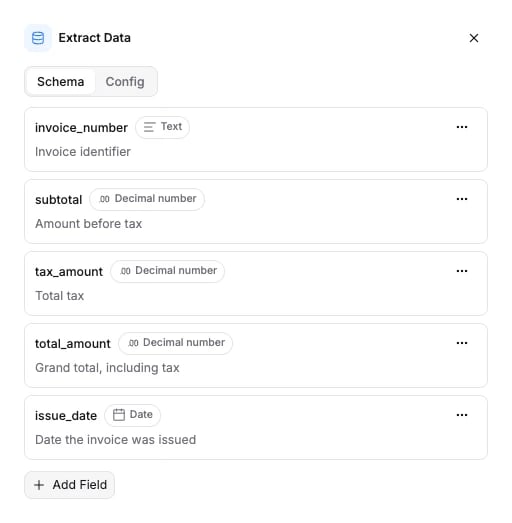
Each field has a name, a description the model reads, and a type. The types (`string`, `float`, `date`, `enum`, `object` and the rest) are on [Field types](/concepts/field-types). How to write a schema that extracts well is on [Schemas](/concepts/schemas).
The same node on the agentic tier, with a [Smart lookup](/guides/nodes/smart-lookup) field that resolves the supplier name against a reference CSV:
```json API theme={null}
{
"id": "extract_1",
"type": "extract",
"mode": "agentic",
"extraction_schema": {
"fields": [
{ "name": "supplier_name", "description": "Supplier name as printed", "data_type": "string" },
{ "name": "supplier_code", "description": "Internal supplier code", "data_type": "string", "source": "smart_lookup" }
]
},
"lookup_file_uploads": [{ "filename": "suppliers.csv", "content": "" }],
"lookup_suggestion": "Match supplier names ignoring legal suffixes like GmbH or Ltd"
}
```
```python Python theme={null}
client.workflow("Invoices with supplier codes").parse().extract(
[
Schema.string("supplier_name", "Supplier name as printed"),
Schema.string("supplier_code", "Internal supplier code", source="smart_lookup"),
],
lookup_files=["suppliers.csv"],
lookup_suggestion="Match supplier names ignoring legal suffixes like GmbH or Ltd",
)
```
```typescript TypeScript theme={null}
af.workflow("Invoices with supplier codes").parse().extract(
[
Schema.string("supplier_name", "Supplier name as printed"),
Schema.string("supplier_code", "Internal supplier code", { source: "smart_lookup" }),
],
{
mode: "agentic",
lookupFiles: ["suppliers.csv"],
lookupSuggestion: "Match supplier names ignoring legal suffixes like GmbH or Ltd",
},
)
```
The SDKs read each path in `lookup_files` from disk and send it as `lookup_file_uploads`. The API call sends the file content inline, base64-encoded.
The Python SDK's `extract()` does not take `mode`, `use_images` or `lookup_reasoning_effort` yet. Set them in the API JSON, in Studio, or from the TypeScript SDK.
A workflow can hold several Extract nodes. After a [Classify](/guides/nodes/classify) or [Split](/guides/nodes/split) node, each Extract sits on one branch and gets its own schema. See those pages for the `branch` argument.
## In Studio
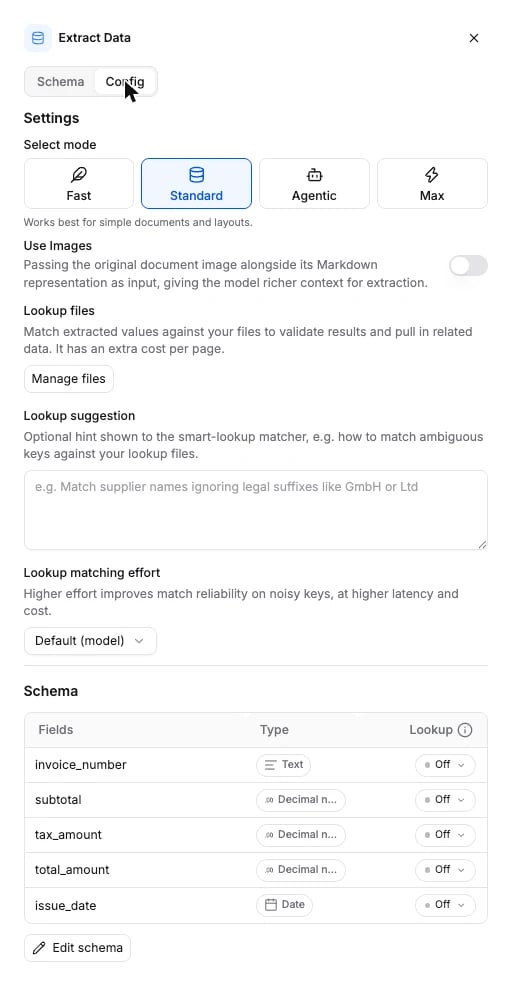
Click the Extract node on the canvas to open its panel. The **Schema** tab holds the fields. The **Config** tab holds the tier cards, the **Use Images** switch, and the **Lookup files**, **Lookup suggestion** and **Lookup matching effort** controls.
 The **Config** tab holds the tier, **Use Images**, the lookup files and matcher settings, and the per-field **Lookup** toggles.
 ## Tiers
| Tier | `mode` | What it does | When to use it | Credits / page |
| --------------- | ---------- | -------------------------------------------------------------------------------------- | ---------------------------------------------------------------- | -------------- |
| **Fast** (Beta) | `lite` | Standard extraction on a faster, cheaper model. | Simple documents at volume. Quality may vary on complex layouts. | 17 |
| **Standard** | `standard` | Single-pass extraction. The default. | Most documents and layouts. Start here. | 35 |
| **Agentic** | `agentic` | Multi-step extraction that maps every table to the schema and reasons across sections. | Dense or cross-page tables, values spread over several sections. | 150 |
Start on Standard. Move down to Fast where it holds up, and up to Agentic only where Standard misses rows or mixes up columns.
## Options
`extraction_schema` is required. Every other field is optional. Omit a field and the default applies.
| Field | Type | Default | What it does |
| ------------------------- | ---------------------------------------- | ---------- | --------------------------------------------------------------------------------------------------------------------------------------------------------------------------------------------------------------------------- |
| `extraction_schema` | object | required | `{ "fields": [...] }`. At least one field. Each field carries `name`, `description`, `data_type`, and optionally `source` and `persistent_id`. See [Field types](/concepts/field-types). |
| `mode` | `standard` \| `agentic` \| `lite` | `standard` | The tier. `lite` is shown as **Fast** in the app. |
| `use_images` | boolean | `false` | Send each PDF page's rendered image alongside its parsed text, so the model can read layout the text missed. Adds vision cost on every page. Standard and Fast only; no effect on Agentic or on non-PDF sources. |
| `lookup_file_uploads` | array of `{ filename, content }` | `[]` | Reference files for [Smart lookup](/guides/nodes/smart-lookup), sent inline with `content` base64-encoded. Each one is uploaded and its URI is appended to `lookup_files`. Create-input only: it is not stored on the node. |
| `lookup_files` | array of string | `[]` | URIs of the reference files already stored on the node. Read this back from `GET`; write `lookup_file_uploads` to add files. |
| `lookup_suggestion` | string | `null` | Free-form hint shown to the lookup matcher, for example "Match supplier names ignoring legal suffixes like GmbH or Ltd". Applies to every lookup field in the node. |
| `lookup_reasoning_effort` | `minimal` \| `low` \| `medium` \| `high` | `null` | How hard the lookup matcher works on noisy or inexact keys. `null` is the model default. Higher effort improves match reliability at higher latency and cost. Only used when the node has at least one lookup field. |
A field's `source` decides where its value comes from: `extraction` (the document, the default), `smart_lookup` (the reference file, always) or `lookup_if_missing` (the document first, the reference file when extraction left it blank).
The schema the API accepts is generated from the same source: [Extract node schema](/api-reference-v3/node-schemas#extract).
## What it returns
Extract fills the `extractions` section of the [run results](/concepts/runs-and-results). A workflow with one Extract and no Split returns one entry, with `split_name` and `partition` set to `null`:
```json theme={null}
"extractions": [
{
"split_name": null,
"partition": null,
"fields": {
"invoice_number": {
"value": "INV-2024-0847",
"value_override": null,
"verification_status": "not_verified",
"confidence": 97.0,
"evidence": [{ "text": "Invoice #INV-2024-0847", "page_number": 1 }]
},
"total_amount": {
"value": "4087.50",
"value_override": null,
"verification_status": "not_verified",
"confidence": 96.0,
"evidence": [{ "text": "Total: $4,087.50", "page_number": 2 }]
}
}
}
]
```
`fields` is keyed by field name. Each value carries `value` (a string on the wire, whatever the field's `data_type`; `null` when nothing was found), `value_override` (a human correction from review, or `null`), `verification_status`, `confidence` on a 0 to 100 scale, and `evidence`: the source snippets and the page each came from.
**Value types on the wire.** Every `value` is a string or `null`, so parse it by the field's `data_type` on your side:
* A `boolean` field returns the string `"True"` or `"False"`.
* A `multi_select` field returns one comma-separated string, for example `"a, b, c"`, not a list.
* A field the model could not find returns `{ "value": null, "value_override": null, "verification_status": "not_verified", "confidence": null, "evidence": [] }`.
* An `object` field returns a list of rows. Each row is a dict from nested field name to the same `{ value, value_override, verification_status, confidence, evidence }` shape.
After a Split node, `extractions` holds one entry per split and partition. See [Split](/guides/nodes/split#what-it-returns).
## Connects to
| Direction | Nodes |
| --------- | ---------------------------------------------------------------------------------------------------------------------------------------------------- |
| Fed by | [Parse](/guides/nodes/parse), [Classify](/guides/nodes/classify), [Split](/guides/nodes/split) |
| Feeds | [Validate](/guides/nodes/validate), [If/Else](/guides/nodes/if-else), [Slack alert](/guides/nodes/slack-alert), [Knowledge](/guides/nodes/knowledge) |
An Extract node has one outgoing edge at most. Add a Validate node to check its values, or an If/Else node to branch on them.
## Billing
Billed per page at the tier's rate (table above). A node with at least one lookup field adds 75 credits per page for Smart Lookup. Schema size and field count do not change the price. Full price list: [How credits work](/concepts/how-credits-work).
## Examples
* [Invoice processing](/examples/invoice-processing): the usual Parse to Extract shape, with line items as an object field.
* [Resume parsing](/examples/resume-parsing): nested fields and multi-select.
* [Contract analysis](/examples/contract-analysis): long documents, dates and enums.
* [Bank statement processing](/examples/bank-statement-processing): Split, then one Extract per statement.
## Tiers
| Tier | `mode` | What it does | When to use it | Credits / page |
| --------------- | ---------- | -------------------------------------------------------------------------------------- | ---------------------------------------------------------------- | -------------- |
| **Fast** (Beta) | `lite` | Standard extraction on a faster, cheaper model. | Simple documents at volume. Quality may vary on complex layouts. | 17 |
| **Standard** | `standard` | Single-pass extraction. The default. | Most documents and layouts. Start here. | 35 |
| **Agentic** | `agentic` | Multi-step extraction that maps every table to the schema and reasons across sections. | Dense or cross-page tables, values spread over several sections. | 150 |
Start on Standard. Move down to Fast where it holds up, and up to Agentic only where Standard misses rows or mixes up columns.
## Options
`extraction_schema` is required. Every other field is optional. Omit a field and the default applies.
| Field | Type | Default | What it does |
| ------------------------- | ---------------------------------------- | ---------- | --------------------------------------------------------------------------------------------------------------------------------------------------------------------------------------------------------------------------- |
| `extraction_schema` | object | required | `{ "fields": [...] }`. At least one field. Each field carries `name`, `description`, `data_type`, and optionally `source` and `persistent_id`. See [Field types](/concepts/field-types). |
| `mode` | `standard` \| `agentic` \| `lite` | `standard` | The tier. `lite` is shown as **Fast** in the app. |
| `use_images` | boolean | `false` | Send each PDF page's rendered image alongside its parsed text, so the model can read layout the text missed. Adds vision cost on every page. Standard and Fast only; no effect on Agentic or on non-PDF sources. |
| `lookup_file_uploads` | array of `{ filename, content }` | `[]` | Reference files for [Smart lookup](/guides/nodes/smart-lookup), sent inline with `content` base64-encoded. Each one is uploaded and its URI is appended to `lookup_files`. Create-input only: it is not stored on the node. |
| `lookup_files` | array of string | `[]` | URIs of the reference files already stored on the node. Read this back from `GET`; write `lookup_file_uploads` to add files. |
| `lookup_suggestion` | string | `null` | Free-form hint shown to the lookup matcher, for example "Match supplier names ignoring legal suffixes like GmbH or Ltd". Applies to every lookup field in the node. |
| `lookup_reasoning_effort` | `minimal` \| `low` \| `medium` \| `high` | `null` | How hard the lookup matcher works on noisy or inexact keys. `null` is the model default. Higher effort improves match reliability at higher latency and cost. Only used when the node has at least one lookup field. |
A field's `source` decides where its value comes from: `extraction` (the document, the default), `smart_lookup` (the reference file, always) or `lookup_if_missing` (the document first, the reference file when extraction left it blank).
The schema the API accepts is generated from the same source: [Extract node schema](/api-reference-v3/node-schemas#extract).
## What it returns
Extract fills the `extractions` section of the [run results](/concepts/runs-and-results). A workflow with one Extract and no Split returns one entry, with `split_name` and `partition` set to `null`:
```json theme={null}
"extractions": [
{
"split_name": null,
"partition": null,
"fields": {
"invoice_number": {
"value": "INV-2024-0847",
"value_override": null,
"verification_status": "not_verified",
"confidence": 97.0,
"evidence": [{ "text": "Invoice #INV-2024-0847", "page_number": 1 }]
},
"total_amount": {
"value": "4087.50",
"value_override": null,
"verification_status": "not_verified",
"confidence": 96.0,
"evidence": [{ "text": "Total: $4,087.50", "page_number": 2 }]
}
}
}
]
```
`fields` is keyed by field name. Each value carries `value` (a string on the wire, whatever the field's `data_type`; `null` when nothing was found), `value_override` (a human correction from review, or `null`), `verification_status`, `confidence` on a 0 to 100 scale, and `evidence`: the source snippets and the page each came from.
**Value types on the wire.** Every `value` is a string or `null`, so parse it by the field's `data_type` on your side:
* A `boolean` field returns the string `"True"` or `"False"`.
* A `multi_select` field returns one comma-separated string, for example `"a, b, c"`, not a list.
* A field the model could not find returns `{ "value": null, "value_override": null, "verification_status": "not_verified", "confidence": null, "evidence": [] }`.
* An `object` field returns a list of rows. Each row is a dict from nested field name to the same `{ value, value_override, verification_status, confidence, evidence }` shape.
After a Split node, `extractions` holds one entry per split and partition. See [Split](/guides/nodes/split#what-it-returns).
## Connects to
| Direction | Nodes |
| --------- | ---------------------------------------------------------------------------------------------------------------------------------------------------- |
| Fed by | [Parse](/guides/nodes/parse), [Classify](/guides/nodes/classify), [Split](/guides/nodes/split) |
| Feeds | [Validate](/guides/nodes/validate), [If/Else](/guides/nodes/if-else), [Slack alert](/guides/nodes/slack-alert), [Knowledge](/guides/nodes/knowledge) |
An Extract node has one outgoing edge at most. Add a Validate node to check its values, or an If/Else node to branch on them.
## Billing
Billed per page at the tier's rate (table above). A node with at least one lookup field adds 75 credits per page for Smart Lookup. Schema size and field count do not change the price. Full price list: [How credits work](/concepts/how-credits-work).
## Examples
* [Invoice processing](/examples/invoice-processing): the usual Parse to Extract shape, with line items as an object field.
* [Resume parsing](/examples/resume-parsing): nested fields and multi-select.
* [Contract analysis](/examples/contract-analysis): long documents, dates and enums.
* [Bank statement processing](/examples/bank-statement-processing): Split, then one Extract per statement.