> ## Documentation Index
> Fetch the complete documentation index at: https://docs.anyformat.ai/llms.txt
> Use this file to discover all available pages before exploring further.
# Edit
> Fills the blank form it was given and returns the completed PDF. Reads the fields off the document itself; you map nothing by hand.
**Edit** fills in a form. It reads the fillable gaps off the document [Parse](/guides/nodes/parse) produced, writes your values into them, and returns a filled PDF you can download. You do not map fields by hand: the node detects them. It lives in the **Intelligence** section of the Studio palette, and it appears there once the feature is enabled for your organization. Edit is in alpha.
The values come from two places: free-text **instructions** on the node, and **reference documents** you upload to the workflow once. A reference is your standing data, for example a company profile CSV or an employee handbook PDF. Every run fills from it without you retyping anything.
## The node
```json API theme={null}
{
"id": "edit_1",
"type": "edit",
"instructions": "Name: ACME SL; Date: 2026-01-01; I accept the terms: yes",
"reference_document_ids": ["069dcc2c-e14c-7606-8000-2ee4fb17b4e2"],
"font": "sans",
"output_mode": "flattened"
}
```
```python Python theme={null}
import os
from anyformat.sdk import Client
client = Client(api_key=os.environ["ANYFORMAT_API_KEY"])
workflow = (
client.workflow("Fill onboarding form")
.parse()
.edit(
instructions="Name: ACME SL; Date: 2026-01-01; I accept the terms: yes",
reference_document_ids=["069dcc2c-e14c-7606-8000-2ee4fb17b4e2"],
)
.create()
)
```
```typescript TypeScript theme={null}
// The TypeScript builder has no edit() method yet. Send the node in the
// workflow's `nodes` array with an edge from the Parse node:
const nodes = [
{ id: "parse_1", type: "parse" },
{
id: "edit_1",
type: "edit",
instructions: "Name: ACME SL; Date: 2026-01-01; I accept the terms: yes",
reference_document_ids: ["069dcc2c-e14c-7606-8000-2ee4fb17b4e2"],
},
];
const edges = [{ source: "parse_1", target: "edit_1" }];
```
The Python builder sets `instructions` and `reference_document_ids`. Set `font` and `output_mode` through the API JSON.
### Reference documents
Upload references to the workflow first, then put the returned ids in `reference_document_ids`:
```bash curl theme={null}
curl -X POST https://api.anyformat.ai/v3/workflows/$WORKFLOW_ID/edit-references/ \
-H "Authorization: Bearer $ANYFORMAT_API_KEY" \
-F "files=@company-profile.csv"
```
```python Python theme={null}
references = client.upload_edit_references(workflow.id, ["company-profile.csv"])
reference_ids = [r.id for r in references]
```
```json theme={null}
{
"documents": [
{ "id": "069dcc2c-e14c-7606-8000-2ee4fb17b4e2",
"name": "company-profile.csv",
"status": "ready",
"truncated": false,
"error": null }
]
}
```
One upload takes 1 to 10 files: `.csv`, `.txt`, `.md`, `.rst` or `.pdf`. A text file comes back `ready` at once. A PDF comes back `pending` while anyformat parses it once, at upload, never on a run. Poll `GET /v3/workflows/{workflow_id}/edit-references/` (Python: `client.list_edit_references(workflow_id)`) until it settles. A run whose Edit node names a reference that is not `ready` is refused, so the form is never filled from a partial reference. `DELETE /v3/workflows/{workflow_id}/edit-references/{document_id}/` removes a reference; remove its id from the node in the same change.
## In Studio
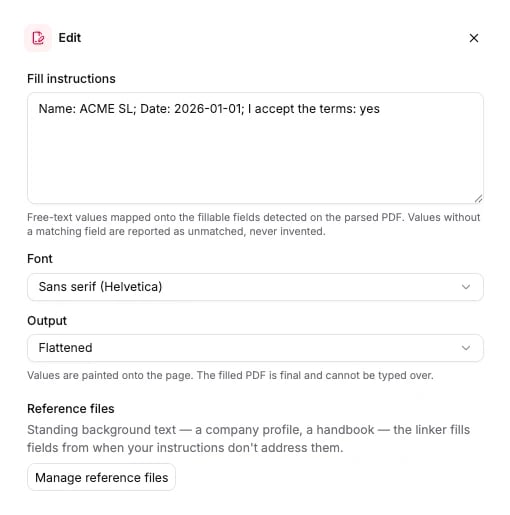
Click the Edit node on the canvas to open its panel. The panel has a **Fill instructions** text box, a font picker, an output mode picker, and a reference files section where you upload and remove reference documents.
 ## Options
Every field is optional. Omit a field and the default applies.
| Field | Type | Default | What it does |
| ------------------------ | --------------------------- | ----------- | -------------------------------------------------------------------------------------------------------------------------------------------------------------------------------------------------------------- |
| `instructions` | string | `null` | Free-text values to write into the detected fields, for example `Name: ACME SL; Date: 2026-01-01; I accept the terms: yes`. Where an instruction and a reference address the same field, the instruction wins. |
| `reference_document_ids` | string\[] | `[]` | Ids of reference documents uploaded to this workflow. Every id must belong to this workflow and be `ready`, or the run is refused. |
| `font` | `sans` \| `serif` \| `mono` | `sans` | Typeface the filled values are written in. |
| `output_mode` | `flattened` \| `editable` | `flattened` | `flattened` paints the values on and the PDF is final. `editable` leaves each value in a live form field a reviewer can correct in any PDF viewer. |
The schema the API accepts is generated from the same source: [Edit node schema](/api-reference-v3/node-schemas#edit).
## What it returns
Edit fills the `edits` section of the [run results](/concepts/runs-and-results): one entry per file, with every form field the node detected, the value written into it, and a link to the filled PDF.
```json theme={null}
"edits": [
{
"file_id": "069dcc2c-e14c-7606-8000-2ee4fb17b4e3",
"file_name": "onboarding-form.pdf",
"fields": [
{
"form_field_id": "p1_f0",
"label": "Full name",
"kind": "text",
"state": "empty",
"page": 1,
"bbox": { "x0": 0.1, "y0": 0.1, "x1": 0.5, "y1": 0.16 },
"value": "ACME SL",
"confidence": 95
}
],
"unmatched_instructions": [],
"download_url": "https://storage.anyformat.ai/filled/onboarding-form.pdf?X-Amz-Signature=..."
}
]
```
`download_url` is valid for 15 minutes from the moment the response was built. Re-read the run for a fresh link instead of storing it. A field with `state: "prefilled"` is never overwritten and keeps `value: null`. `confidence` grades how surely an instruction addresses the field, not whether the written value is correct. `unmatched_instructions` lists the instruction fragments that matched no field. The full field reference is on [Get run](/api-reference-v3/runs/get#filled-forms-edits).
In the Python SDK, `run.wait().edits` holds the same entries.
## Connects to
| Direction | Nodes |
| --------- | --------------------------------- |
| Fed by | [Parse](/guides/nodes/parse) only |
| Feeds | nothing. Edit is a terminal node. |
Edit reads geometry straight from the parsed document, so it sits directly after Parse. A Classify or Extract in between adds nothing it can use. The Python builder accepts one Edit node per workflow.
## Billing
**35 credits per page** of the form the node fills. A PDF reference costs **25 credits per page, once, when you upload it**, because that upload is a parse. Runs that use the reference afterwards pay nothing for it. Text references (`.csv`, `.txt`, `.md`, `.rst`) are free. Full price list: [How credits work](/concepts/how-credits-work).
## Examples
* Fill a supplier onboarding form from your company profile: upload `company-profile.csv` as a reference, build `Parse → Edit` with its id, run the blank form through the workflow, and download `edits[0].download_url`.
* Let a reviewer correct the result: set `output_mode: "editable"` so every value stays in a live form field.
* [Parse-only workflow](/examples/parse-only-workflow): the Parse node that Edit reads from.
## Options
Every field is optional. Omit a field and the default applies.
| Field | Type | Default | What it does |
| ------------------------ | --------------------------- | ----------- | -------------------------------------------------------------------------------------------------------------------------------------------------------------------------------------------------------------- |
| `instructions` | string | `null` | Free-text values to write into the detected fields, for example `Name: ACME SL; Date: 2026-01-01; I accept the terms: yes`. Where an instruction and a reference address the same field, the instruction wins. |
| `reference_document_ids` | string\[] | `[]` | Ids of reference documents uploaded to this workflow. Every id must belong to this workflow and be `ready`, or the run is refused. |
| `font` | `sans` \| `serif` \| `mono` | `sans` | Typeface the filled values are written in. |
| `output_mode` | `flattened` \| `editable` | `flattened` | `flattened` paints the values on and the PDF is final. `editable` leaves each value in a live form field a reviewer can correct in any PDF viewer. |
The schema the API accepts is generated from the same source: [Edit node schema](/api-reference-v3/node-schemas#edit).
## What it returns
Edit fills the `edits` section of the [run results](/concepts/runs-and-results): one entry per file, with every form field the node detected, the value written into it, and a link to the filled PDF.
```json theme={null}
"edits": [
{
"file_id": "069dcc2c-e14c-7606-8000-2ee4fb17b4e3",
"file_name": "onboarding-form.pdf",
"fields": [
{
"form_field_id": "p1_f0",
"label": "Full name",
"kind": "text",
"state": "empty",
"page": 1,
"bbox": { "x0": 0.1, "y0": 0.1, "x1": 0.5, "y1": 0.16 },
"value": "ACME SL",
"confidence": 95
}
],
"unmatched_instructions": [],
"download_url": "https://storage.anyformat.ai/filled/onboarding-form.pdf?X-Amz-Signature=..."
}
]
```
`download_url` is valid for 15 minutes from the moment the response was built. Re-read the run for a fresh link instead of storing it. A field with `state: "prefilled"` is never overwritten and keeps `value: null`. `confidence` grades how surely an instruction addresses the field, not whether the written value is correct. `unmatched_instructions` lists the instruction fragments that matched no field. The full field reference is on [Get run](/api-reference-v3/runs/get#filled-forms-edits).
In the Python SDK, `run.wait().edits` holds the same entries.
## Connects to
| Direction | Nodes |
| --------- | --------------------------------- |
| Fed by | [Parse](/guides/nodes/parse) only |
| Feeds | nothing. Edit is a terminal node. |
Edit reads geometry straight from the parsed document, so it sits directly after Parse. A Classify or Extract in between adds nothing it can use. The Python builder accepts one Edit node per workflow.
## Billing
**35 credits per page** of the form the node fills. A PDF reference costs **25 credits per page, once, when you upload it**, because that upload is a parse. Runs that use the reference afterwards pay nothing for it. Text references (`.csv`, `.txt`, `.md`, `.rst`) are free. Full price list: [How credits work](/concepts/how-credits-work).
## Examples
* Fill a supplier onboarding form from your company profile: upload `company-profile.csv` as a reference, build `Parse → Edit` with its id, run the blank form through the workflow, and download `edits[0].download_url`.
* Let a reviewer correct the result: set `output_mode: "editable"` so every value stays in a live form field.
* [Parse-only workflow](/examples/parse-only-workflow): the Parse node that Edit reads from.