> ## Documentation Index
> Fetch the complete documentation index at: https://docs.anyformat.ai/llms.txt
> Use this file to discover all available pages before exploring further.
# Classify
> Labels the document as one of your categories and routes it down that category's branch.
**Classify** reads the parsed document and picks one of the categories you define. Each category is an outgoing branch, so a mixed inbox of invoices and receipts can flow to an [Extract](/guides/nodes/extract) node built for each kind. It lives in the **Intelligence** section of the Studio palette.
A Classify node needs at least one **category**: an id, a name and a description the model reads. Every edge leaving the node names the category it fires for.
## The node
```json API theme={null}
{
"id": "classify_1",
"type": "classify",
"categories": [
{ "id": "INVOICE", "name": "Invoice", "description": "A vendor invoice requesting payment." },
{ "id": "RECEIPT", "name": "Receipt", "description": "A point-of-sale receipt for a completed payment." }
]
}
```
```python Python theme={null}
import os
from anyformat.sdk import Client
from anyformat.workflow import ClassifyCategory, Schema
client = Client(api_key=os.environ["ANYFORMAT_API_KEY"])
invoice = ClassifyCategory(id="INVOICE", name="Invoice", description="A vendor invoice requesting payment.")
receipt = ClassifyCategory(id="RECEIPT", name="Receipt", description="A point-of-sale receipt for a completed payment.")
workflow = (
client.workflow("Invoice or Receipt")
.parse()
.classify(invoice, receipt)
.extract([Schema.string("vendor", "Vendor name")], branch=invoice)
.extract([Schema.string("merchant", "Merchant name")], branch=receipt)
.create()
)
```
```typescript TypeScript theme={null}
import { Anyformat, Schema } from "@anyformat/sdk";
const af = new Anyformat({ apiKey: process.env.ANYFORMAT_API_KEY! });
const invoice = { id: "INVOICE", name: "Invoice", description: "A vendor invoice requesting payment." };
const receipt = { id: "RECEIPT", name: "Receipt", description: "A point-of-sale receipt for a completed payment." };
const workflow = await af
.workflow("Invoice or Receipt")
.parse()
.classify([invoice, receipt])
.extract([Schema.string("vendor", "Vendor name")], { branch: invoice })
.extract([Schema.string("merchant", "Merchant name")], { branch: receipt })
.create();
```
In the API, routing lives on the edges. An edge that leaves a Classify node must set `branch` to a category **id**, not its name:
```json theme={null}
"edges": [
{ "source": "parse_1", "target": "classify_1" },
{ "source": "classify_1", "target": "extract_1", "branch": "INVOICE" },
{ "source": "classify_1", "target": "extract_2", "branch": "RECEIPT" }
]
```
The SDKs write these edges for you. `branch` accepts the category object or its id string. Once a workflow has a Classify node, every `extract()` call needs a `branch`.
The same node with extra instructions for the classifier:
```json API theme={null}
{
"id": "classify_1",
"type": "classify",
"user_prompt": "Classify by the document title. A credit note counts as an invoice.",
"categories": [
{ "id": "INVOICE", "name": "Invoice", "description": "A vendor invoice requesting payment." },
{ "id": "RECEIPT", "name": "Receipt", "description": "A point-of-sale receipt for a completed payment." }
]
}
```
```python Python theme={null}
# The Python SDK's classify() takes categories only. Set user_prompt in the API JSON or in Studio.
```
```typescript TypeScript theme={null}
// The TypeScript SDK's classify() takes categories only. Set user_prompt in the API JSON or in Studio.
```
## In Studio
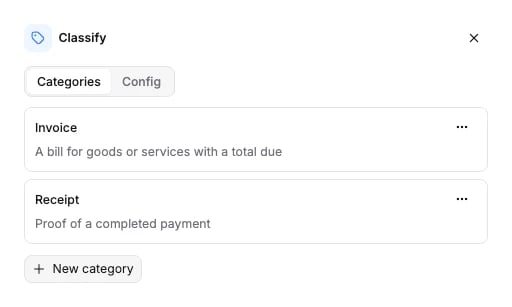
Click the Classify node on the canvas to open its panel. Add a category with its **Type** (the name) and **Description**. The **Describe classification process** box is the `user_prompt`. Each category appears as a port on the node; drag from a port to the node that handles that category.
 ## Options
`categories` is required. `user_prompt` is optional.
| Field | Type | Default | What it does |
| -------------------------- | ----------------- | -------- | ------------------------------------------------------------------------------------------------------------------------------------------------------ |
| `categories` | array of category | required | At least one. Each category has `id`, `name` and `description`, all non-empty strings. |
| `categories[].id` | string | required | Stable id. Edges route on it: an outgoing edge's `branch` must equal one category's `id`. |
| `categories[].name` | string | required | The name shown to the model. Classification keys off it, so it must be unique within the node. |
| `categories[].description` | string | required | What the category covers, written for the model. The more distinct the descriptions, the better the split between categories. |
| `user_prompt` | string | `null` | Extra instructions inserted between the classifier's system prompt and the document text, for example a tie-break rule between two similar categories. |
The schema the API accepts is generated from the same source: [Classify node schema](/api-reference-v3/node-schemas#classify).
## What it returns
Classify fills the `classifications` section of the [run results](/concepts/runs-and-results), one verdict per Classify node that ran:
```json theme={null}
"classifications": [
{
"category": "Invoice",
"confidence": 100.0,
"evidence": "The document is explicitly titled \"INVOICE\" and includes invoice number INV-2026-9001."
}
]
```
`category` is the category **name**, not its id. `confidence` is on a 0 to 100 scale, `null` when no score was measured. `evidence` is one free-form string the classifier wrote, not a list of snippets; it is `null` when none was captured.
The Extract node on the chosen branch fills `extractions[]` as usual: one entry, with `split_name` and `partition` set to `null`, because Classify routes the whole document and does not split it. See [Extract](/guides/nodes/extract#what-it-returns).
## Connects to
| Direction | Nodes |
| --------- | ---------------------------------------------------------------------------------------------------- |
| Fed by | [Parse](/guides/nodes/parse) |
| Feeds | [Extract](/guides/nodes/extract), [Split](/guides/nodes/split), [Knowledge](/guides/nodes/knowledge) |
Each outgoing edge carries one category id, and each category id appears on one edge at most. Several categories may point at the same Extract node. A workflow has one Classify node at most in the SDK builders.
To split a file after classifying it, connect one category to a Split node. In the SDKs, `split(..., route_from=)` names that category.
## Billing
Billed at 10 credits per page. Full price list: [How credits work](/concepts/how-credits-work).
## Examples
* [Receipt scanning](/examples/receipt-scanning): invoices and receipts in one inbox, one Extract per kind.
* [Email lead extraction](/examples/email-lead-extraction): sort incoming mail before extracting.
* [Bank statement processing](/examples/bank-statement-processing): Classify feeding a Split node.
## Options
`categories` is required. `user_prompt` is optional.
| Field | Type | Default | What it does |
| -------------------------- | ----------------- | -------- | ------------------------------------------------------------------------------------------------------------------------------------------------------ |
| `categories` | array of category | required | At least one. Each category has `id`, `name` and `description`, all non-empty strings. |
| `categories[].id` | string | required | Stable id. Edges route on it: an outgoing edge's `branch` must equal one category's `id`. |
| `categories[].name` | string | required | The name shown to the model. Classification keys off it, so it must be unique within the node. |
| `categories[].description` | string | required | What the category covers, written for the model. The more distinct the descriptions, the better the split between categories. |
| `user_prompt` | string | `null` | Extra instructions inserted between the classifier's system prompt and the document text, for example a tie-break rule between two similar categories. |
The schema the API accepts is generated from the same source: [Classify node schema](/api-reference-v3/node-schemas#classify).
## What it returns
Classify fills the `classifications` section of the [run results](/concepts/runs-and-results), one verdict per Classify node that ran:
```json theme={null}
"classifications": [
{
"category": "Invoice",
"confidence": 100.0,
"evidence": "The document is explicitly titled \"INVOICE\" and includes invoice number INV-2026-9001."
}
]
```
`category` is the category **name**, not its id. `confidence` is on a 0 to 100 scale, `null` when no score was measured. `evidence` is one free-form string the classifier wrote, not a list of snippets; it is `null` when none was captured.
The Extract node on the chosen branch fills `extractions[]` as usual: one entry, with `split_name` and `partition` set to `null`, because Classify routes the whole document and does not split it. See [Extract](/guides/nodes/extract#what-it-returns).
## Connects to
| Direction | Nodes |
| --------- | ---------------------------------------------------------------------------------------------------- |
| Fed by | [Parse](/guides/nodes/parse) |
| Feeds | [Extract](/guides/nodes/extract), [Split](/guides/nodes/split), [Knowledge](/guides/nodes/knowledge) |
Each outgoing edge carries one category id, and each category id appears on one edge at most. Several categories may point at the same Extract node. A workflow has one Classify node at most in the SDK builders.
To split a file after classifying it, connect one category to a Split node. In the SDKs, `split(..., route_from=)` names that category.
## Billing
Billed at 10 credits per page. Full price list: [How credits work](/concepts/how-credits-work).
## Examples
* [Receipt scanning](/examples/receipt-scanning): invoices and receipts in one inbox, one Extract per kind.
* [Email lead extraction](/examples/email-lead-extraction): sort incoming mail before extracting.
* [Bank statement processing](/examples/bank-statement-processing): Classify feeding a Split node.