> ## Documentation Index
> Fetch the complete documentation index at: https://docs.anyformat.ai/llms.txt
> Use this file to discover all available pages before exploring further.
# Studio
> The visual editor where you build a workflow by connecting steps on a canvas.
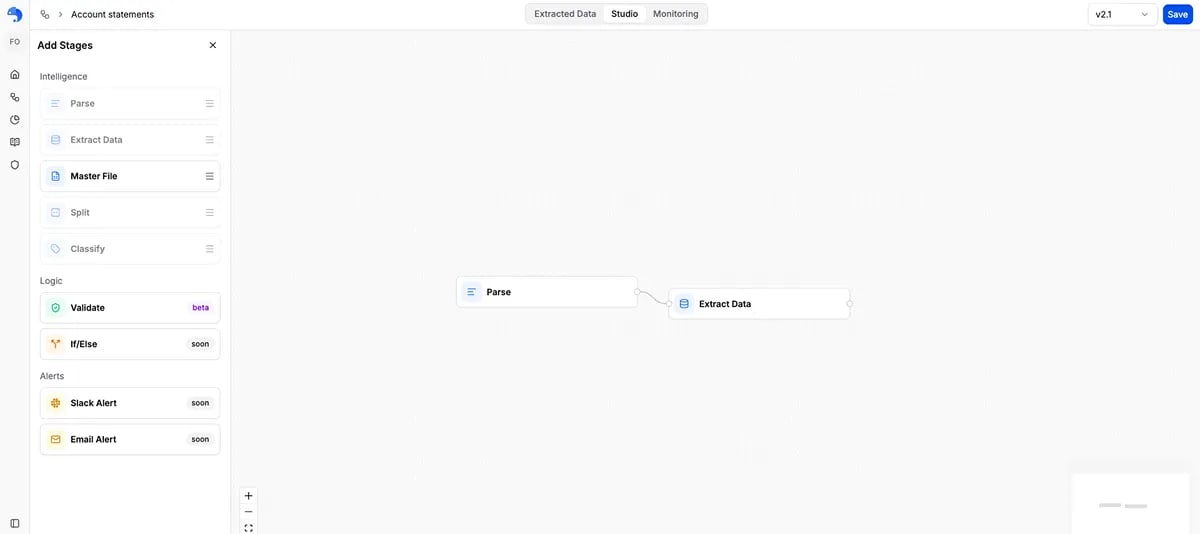
**Studio** is the visual editor where you refine a [workflow](/concepts/workflows) step by step. You see the steps on a canvas, connect them, and configure each one — like a flowchart you can edit.
You usually arrive in Studio by [describing what you want to annie](/concepts/annie) — she builds a Parse → Extract workflow and opens it here for you. Studio is where you take it further: reorder or add steps, sort documents by type, split a file that holds several documents, or check results against your own rules.
 ***
## How to open Studio
* **Create a new workflow:** describe what you want to [annie](/concepts/annie) on the home screen. She builds the workflow and drops you into Studio, with the conversation continuing in the **Chat** tab.
* **On an existing workflow:** open the workflow and click the **Studio** tab.
***
## The building blocks
You drag these from the **Add Stages** panel on the left. Most workflows only use the first two.
| Step | What it does |
| --------------------- | --------------------------------------------------------------------------------------------------- |
| **Parse** | Reads the document and turns it into clean text and tables. Every workflow starts here. |
| **Extract** | Pulls out the specific fields you ask for. |
| **Classify** | Sorts documents into types you define, so each type can be handled differently. |
| **Split** | Breaks one file that contains several documents into separate pieces. |
| **Validate** *(Beta)* | Checks the extracted data against rules you write in plain language, and flags anything that fails. |
***
## What's next?
Step-by-step: open Studio, add steps, connect them, and configure each one
The mental model behind the building blocks
***
## How to open Studio
* **Create a new workflow:** describe what you want to [annie](/concepts/annie) on the home screen. She builds the workflow and drops you into Studio, with the conversation continuing in the **Chat** tab.
* **On an existing workflow:** open the workflow and click the **Studio** tab.
***
## The building blocks
You drag these from the **Add Stages** panel on the left. Most workflows only use the first two.
| Step | What it does |
| --------------------- | --------------------------------------------------------------------------------------------------- |
| **Parse** | Reads the document and turns it into clean text and tables. Every workflow starts here. |
| **Extract** | Pulls out the specific fields you ask for. |
| **Classify** | Sorts documents into types you define, so each type can be handled differently. |
| **Split** | Breaks one file that contains several documents into separate pieces. |
| **Validate** *(Beta)* | Checks the extracted data against rules you write in plain language, and flags anything that fails. |
***
## What's next?
Step-by-step: open Studio, add steps, connect them, and configure each one
The mental model behind the building blocks